
How to Adjust an Office Chair: Fit It in This Order, With the Numbers
Most office chairs have the same handful of controls, but the pages that explain them give different orders and different numbers. OSHA, the US Occupational Safety and Health Administration, says what a chair should do but gives no inch figures. CCOHS, the Canadian Centre for Occupational Health and Safety, gives a five-step order and a clenched-fist check. The UK Health and Safety Executive (HSE) gives a 2 to 3 cm (about 1 inch) gap behind the knee.
This guide puts those sources side by side and uses CCOHS’s order as the spine, because, of the three safety bodies, it is the only one written as steps. It also says what the sources suggest when your chair lacks a control. Your chair’s own manual still decides where each lever is.
How we researched this
We don’t test chairs or steps ourselves. The numbers come from OSHA’s chairs page, the CCOHS fact sheet on adjusting office chairs (last revised March 10, 2014, confirmed current February 4, 2025) and its ergonomic chair fact sheet, and the UK HSE page on good posture. We also read pages from UCLA Health, Expert Reviews, Tom’s Guide and Haworth, named below. See the full method.
Quick answer
Set the seat height first, so your whole foot rests on the floor and the highest point of the seat is just below your kneecap. Then check the gap between the seat and the back of your knees (CCOHS says a clenched fist, about 5 cm or 2 inches; HSE says 2 to 3 cm, about 1 inch). Fit the backrest to the hollow of your lower back, raise the armrests until they barely touch the undersides of your elbows, and set the tilt last. If your chair cannot do a step, the sources name a fix: a footrest, a cushion or taking the armrests off.
The order to adjust in
Seat height comes first because every other step depends on it: the knee gap, the backrest and the armrests all move when the seat moves. The order below follows CCOHS, with the other sources added where they give a number or a test.
- 1. Seat height. Stand in front of the chair and set the highest point of the seat just below your kneecap. Sit down with your feet flat. Check: Your whole foot rests on the floor. UCLA Health says pressure near the back of the seat means raise the chair, and pressure near the front means lower it. Source: CCOHS, OSHA, UCLA Health.
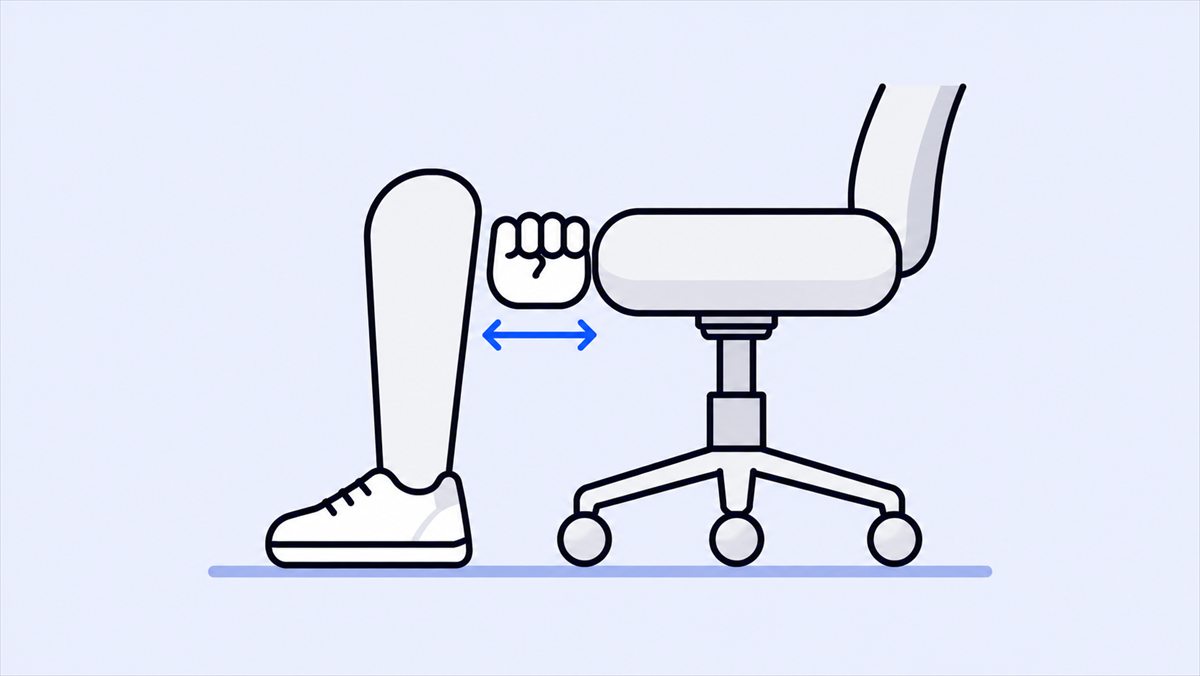
- 2. Seat depth. Sit all the way back and slide the seat forward or back if your chair allows it. Check: CCOHS says a clenched fist (about 5 cm or 2 inches) fits between the front edge of the seat and your calves. HSE says 2 to 3 cm between the seat and the back of the knee. OSHA says the seat should not touch the back of the knee. Source: CCOHS, HSE, OSHA.
- 3. Backrest. Move the backrest up or down and forward or back so the lumbar support fits the hollow of your lower back. Check: OSHA says the lumbar support should be height adjustable and the backrest should recline at least 15 degrees from the vertical, with a lock or tension control. Source: CCOHS, OSHA, UCLA Health.
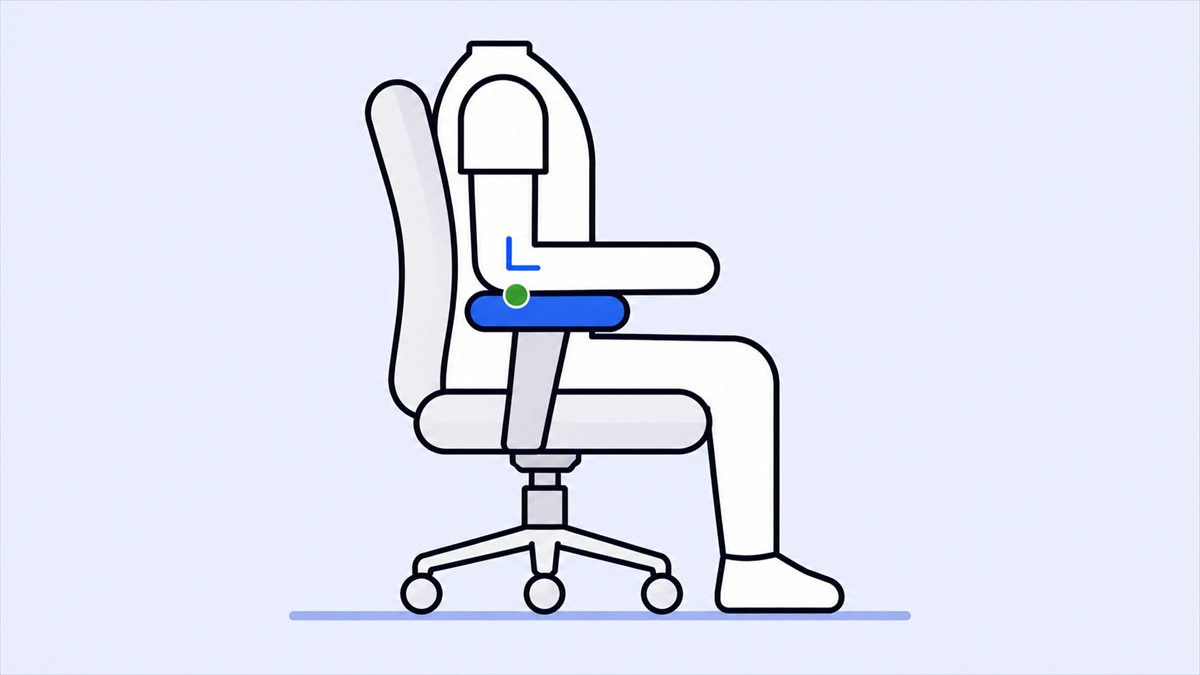
- 4. Armrests. Let your arms hang with your elbows at about 90 degrees, then raise the armrests until they barely touch the undersides of your elbows. Check: CCOHS says to take the armrests off if they lift your elbows even at their lowest setting. UCLA Health says they should not stop the chair from being drawn close to the desk. Source: CCOHS, Expert Reviews, UCLA Health.
- 5. Tilt and tension. Tilt the seat forward or back if you prefer, and lock the backrest or set its recline tension. Check: CCOHS says to tilt the seat “if you prefer”. UCLA Health says a seat tilt of 5 degrees is usually recommended. OSHA says the backrest should lock or be tension adjustable. Source: CCOHS, UCLA Health, OSHA.
Two sources order the steps differently. UCLA Health lists height, back support, seat tilt, depth, width and armrests, and Expert Reviews (updated February 16, 2024) checks the desk first, then seat height and depth, backrest and armrests. Haworth’s guide for its Fern chair lists lumbar, arms, tilt tension, forward tilt and seat height with no order and no numbers, which shows that the controls differ by chair.
Measure it, with made-up numbers to follow
These are made-up numbers to show the arithmetic; use your own. CCOHS’s chair fact sheet gives a rule of thumb that the best seat height is about one quarter of your body height. For someone 68 inches tall, one quarter is 17 inches, so the top of the seat would start near 17 inches from the floor. The rule is a starting point, and the kneecap and foot-flat checks above decide the final setting.
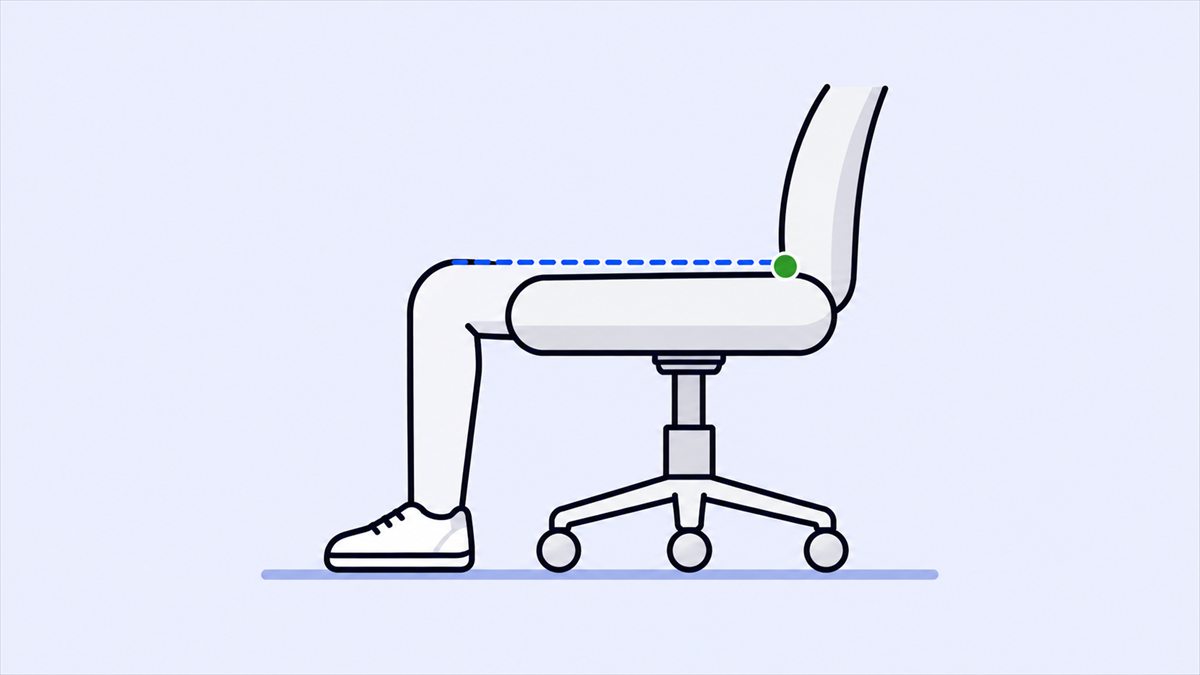
The knee gap sources use different measures, so convert them before you compare. HSE’s 2 to 3 cm is about 0.8 to 1.2 inches. CCOHS’s clenched fist is about 5 cm, or 2 inches. The two sources would put the seat at different depths, and the chair’s own depth control decides which of them you can reach.
If your desk is a fixed height, CCOHS says your elbows should be about the same height as the work surface. Say your desk surface is 29 inches from the floor and your elbows are 27 inches from the floor when your feet are flat. Raising the chair 2 inches lifts your elbows to 29 inches, but your feet may then leave the floor, and OSHA says a footrest is the answer when the seat cannot be lowered.
Where the sources disagree
The safety bodies and the other pages agree on the steps and differ on four numbers. Where they differ, this guide treats the safety bodies’ wording as the baseline and says so.
- Gap behind the knee. OSHA, CCOHS and HSE: OSHA: no figure, avoid contact. CCOHS: about 5 cm (2 inches), a clenched fist. HSE: 2 to 3 cm. Other pages: Expert Reviews: about three finger widths. Tom’s Guide (December 10, 2024): a few inches.
- Armrest height. OSHA, CCOHS and HSE: CCOHS: barely touching the undersides of the elbows. OSHA: low enough for relaxed shoulders and high enough to support the lower arms. Other pages: Expert Reviews: barely touching the underside of the forearm. Tom’s Guide: a few inches lower than where your arms touch while typing.
- Back angle. OSHA, CCOHS and HSE: OSHA: at least 15 degrees from the vertical, which is about 105 degrees between the back and horizontal thighs (our arithmetic). Other pages: Expert Reviews: around 100 degrees. UCLA Health: 110 degrees is usually recommended.
- Seat height. OSHA, CCOHS and HSE: OSHA: back of the knee slightly higher than the seat. CCOHS: highest point of the seat just below the kneecap, or about one quarter of body height. HSE: the seat supports the front and back of the thighs equally. Other pages: Tom’s Guide: knees at a right angle. Expert Reviews: knees below the hips.
None of these pages tested their advice, and Tom’s Guide carries affiliate links to chairs on the page. The numbers are starting points for your body, not a standard, and the pages disagree enough that the foot-flat, kneecap and fist checks are a better guide than any single figure.
If your chair cannot do a step
Many chairs lack a control. These are the fixes the sources name, so you can keep the step and change what you use.
- If your chair cannot go low enough for your feet to rest on the floor. Use a footrest, which gives your feet stable support. Source: OSHA.
- If your chair is too low for your thighs to rest on the seat evenly. Use a cushion to raise the seat. Source: HSE.
- If your chair has a seat that is too deep. Try a back support, such as a lumbar pillow, so you can use the backrest without the seat pressing behind your knees. Source: UCLA Health.
- If your chair has little lower back support. Use a cushion to add back support. Source: HSE.
- If your chair has armrests that lift your elbows even at the lowest setting. Take the armrests off. Source: CCOHS.
- If your chair has armrests that stop it from being drawn close to the desk. Choose or adjust armrests that let the chair move in. UCLA Health says armrests should not stop this. Source: UCLA Health.
- If your chair has a backrest that does not lock or adjust its recline tension. OSHA says a backrest should lock in place or be tension adjustable, so a chair without either is outside its description. Source: OSHA.
- If your chair has four legs or fewer on its base. OSHA says a base with four legs or fewer is prone to tipping and recommends five. Source: OSHA.
- If your chair is too big or too small for your body. CCOHS says a chair fits about 90 percent of people and the shortest and tallest 5 percent will need custom-made chairs. Source: CCOHS.
A cushion or footrest is an add-on, not an adjustment, and the sources do not say which brands or sizes to use. We do not name products here.
What your chair settings change on the rest of your desk
A chair is one part of a fit, and moving it moves the other parts. Our guide to the whole ergonomic desk setup puts the chair first and the other steps in order. OSHA says to keep your elbows about the same height as the keyboard, and our guide to under-desk keyboard trays shows how to measure that. Raising the chair lifts your eyes, which changes the screen height: our guide to monitor height and distance covers the numbers, including OSHA’s advice for bifocal wearers to raise the chair.
OSHA also says the casters should suit your floor and recommends a five-leg base. Our guide to chair mats for hardwood floors and carpet compares mats by floor type and pile height. If you sit for long stretches and something still feels wrong after you have set the chair, that is a question for a health professional rather than a setting, and this guide does not give medical advice.
Check what is under your chair
OSHA says a chair’s casters should suit the floor. Our chair mat guide compares mats by floor type, pile height, size and thickness.
How we research
For this guide we used OSHA’s Computer Workstations eTool page on chairs (no date shown). We also used the CCOHS fact sheets on adjusting office chairs (last revised March 10, 2014, confirmed current February 4, 2025) and on the ergonomic chair (last revised January 7, 2021, confirmed current June 1, 2026), and the UK HSE page on good posture (updated March 20, 2025). The other pages are from UCLA Health, Expert Reviews (updated February 16, 2024), Tom’s Guide (published December 10, 2024) and Haworth, with the dates named above. We do not test chairs or steps ourselves and we do not claim that any setting prevents or relieves discomfort. The conversions between centimeters, inches and degrees, and the example numbers, are our own arithmetic and are made up.
Frequently asked questions
How do I adjust my office chair for my height?
CCOHS gives this order. Set the seat height so the highest point of the seat is just below your kneecap, and check that a clenched fist fits between the seat edge and your calves. Then fit the backrest to the hollow of your lower back, raise the armrests until they barely touch the undersides of your elbows, and tilt the seat if you prefer.
How high should my office chair be?
CCOHS and UCLA Health say the highest point of the seat should be just below your kneecap, with your feet flat on the floor. CCOHS also gives a rule of thumb of about one quarter of your body height. OSHA says your whole foot should rest on the floor.
How far should the seat be from the back of my knees?
The sources differ. CCOHS says a clenched fist, about 5 cm (2 inches), between the seat edge and your calves. HSE says 2 to 3 cm (about 1 inch) between the seat and the back of the knee. OSHA gives no figure and says the seat should not touch the back of the knee.
Where should my armrests be?
CCOHS says to raise them until they barely touch the undersides of your elbows when your elbows are at about 90 degrees, and to take them off if they lift your elbows at their lowest setting. Tom’s Guide says a few inches lower. OSHA says low enough for relaxed shoulders and high enough to support the lower arms.
How far back should I recline?
OSHA says the backrest should recline at least 15 degrees from the vertical and lock or be tension adjustable. UCLA Health says an upper body angle of 110 degrees is usually recommended, and Expert Reviews says around 100 degrees.
What if my feet do not reach the floor?
OSHA says to use a footrest when the seat cannot be lowered. HSE says a cushion can raise the seat when it is too low for your thighs to rest on it evenly. The two fixes are for opposite problems, so check which one you have.
Does this guide give medical advice?
No. It reports what OSHA, CCOHS, HSE and the other pages say about how to fit a chair. We do not say that any setting prevents or relieves discomfort, and a problem that continues is a question for a health professional.
Written by