
Best Under-Desk Keyboard Trays: Check the Desk Thickness, Adjustability and Elbow Height
Disclosure: As an Amazon Associate, we earn from qualifying purchases. This costs you nothing extra and does not change which products we pick. Read our disclosure.
An under-desk keyboard tray holds your keyboard and mouse below the desktop and slides out when you type. OSHA, the US Occupational Safety and Health Administration, says a tray should be adjustable in height and tilt, give leg and foot clearance, and have room for a keyboard and a mouse, so this guide checks five trays against those three points before it says what we would pick.
We compare five trays in the under $50 and $50–$100 price bands as of November 22, 2026. Only one listing states both a height and a tilt adjustment, and the clamp-on trays state maximum desk thicknesses from 1.25 to 2.3 inches, so the desk you have may decide for you. We found no lab test of keyboard trays, so every figure here comes from a seller’s Amazon listing or a maker’s page, and the guide says which.
How we researched this
We don’t test products ourselves, and we found no lab test of keyboard trays. Specs come from the seller’s Amazon listing for each of the five trays, with VIVO’s own page, StarTech’s own page and HUANUO’s own page for warranties and fit limits. Positioning advice comes from OSHA’s keyboards page and the CCOHS keyboard fact sheet (revised 2022). See the full method.
Quick answer
Check your desk thickness and your elbow height first, then pick the tray.
If you want a tray that does what OSHA describes, the HUANUO is the only listing that states both a height adjustment (6.3 inches) and a tilt adjustment (6 degrees up, 22 down), and it screws into the desk. If your desk is thick, the StarTech clamps onto desks up to 2.3 inches and states three heights and a 26.5 pound capacity. The VIVO is the lowest-priced and has a fixed platform. We found no independent test of any of them, so every limit here is the seller’s or the maker’s own.
Jump to your situation
Most adjustment stated
HUANUO Under Desk Keyboard Tray, 25 x 9.8 Inch
The only listing that states both height (6.3 inches) and tilt (6 degrees up, 22 down), plus a 180 degree swivel; it screws into the desk.
Price band: $50–$100
Thickest desks
StarTech Under-Desk Keyboard Tray, Clamp-On (KEYBOARD-TRAY-CLAMP1)
Clamps onto desks up to 2.3 inches thick, with three stated heights and a 26.5 pound capacity.
Price band: $50–$100
Lowest price
VIVO Clamp-On Keyboard and Mouse Tray, 27 x 11 Inch (MOUNT-KB05E)
A fixed clamp-on tray, 26.8 by 11 inches, rated for 11 pounds, in the under $50 band; it states no height or tilt adjustment.
Price band: Under $50
What OSHA says a keyboard tray should do
OSHA’s Computer Workstations eTool says a keyboard tray may be needed if the work surface or the chair cannot be properly adjusted. It says the tray should be adjustable in height and tilt, provide adequate leg and foot clearance, and have adequate space for more than one input device, such as a keyboard and a mouse. It also says the work surface should generally be no more than 2 inches thick.
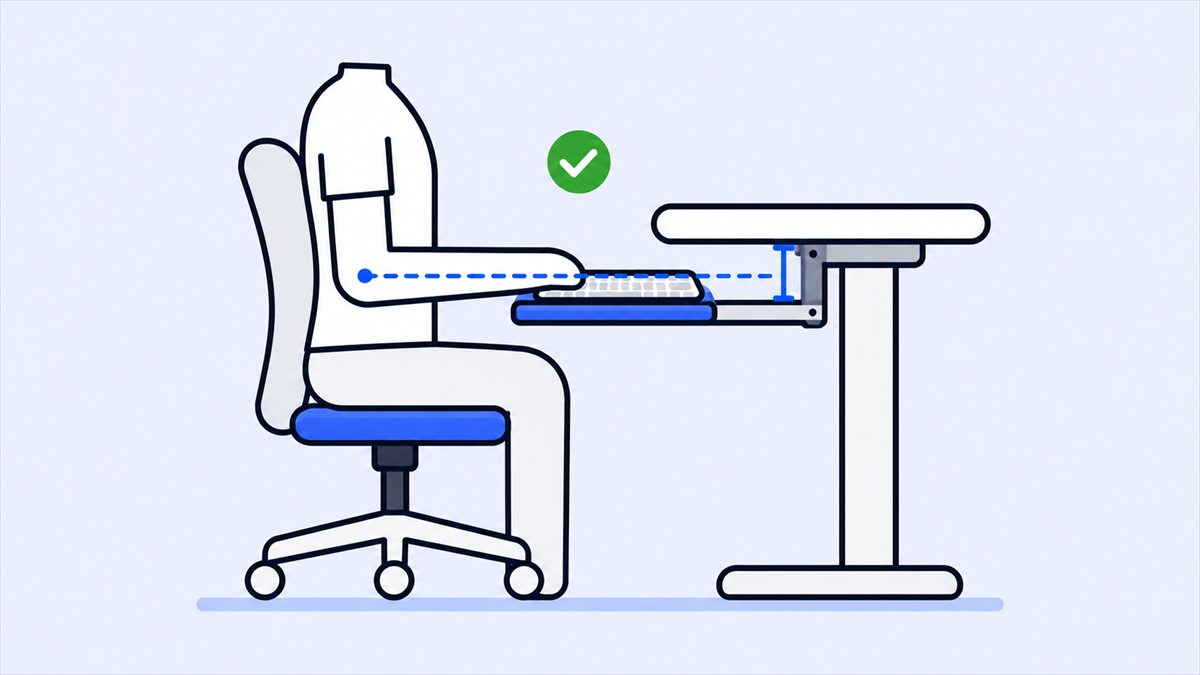
On posture, OSHA says to put the keyboard directly in front of you with your elbows close to your body and about the same height as the keyboard, your forearms approximately parallel with the floor, and your wrists straight. It says the tilt may need to be raised or lowered to keep the wrists neutral, and that raising the back or the front of the keyboard depends on the user’s posture. OSHA gives no tilt angle and no keyboard height in inches.
The CCOHS keyboard fact sheet (first published and revised February 28, 2022) says no keyboard design is universally best and the goal is a neutral wrist position. It names a keyboard tray that tilts as an accessory that lets you raise the back or the front of the keyboard, and says to keep your elbows at about 90 degrees (between 90 and 110) and the keyboard about 2 inches from the desk edge.
Here is what each listing states against OSHA’s three points. “Not stated” means the listing gives no figure.
| Tray | Height adjustment | Tilt adjustment | Platform size | Clearance the listing gives |
|---|---|---|---|---|
| HUANUO | 6.3 in | 6° up, 22° down | 25 x 9.84 in; fits keyboards up to 17.3 x 5.5 in | 14.17 in to a crossbar (16.22 in to slide fully under) |
| StarTech | Three settings: 3.9, 4.7 and 5.5 in from the desk surface to the tray | Not stated | 27.5 x 12.2 in | Not stated |
| VIVO | Not stated | Not stated | 26.8 x 11 in | Sits 1.5 to 2.75 in below the desk (VIVO’s page) |
| EUREKA | Bracket holes | Not stated | 27.95 x 11.82 in | 30 in from desktop to floor; 34 x 15 in of space under the desk |
| Mount-It! | Not stated | Not stated | 26.4 x 11.8 in | 5.55 in tall with the clamp attached |
Only the HUANUO states both adjustments. The StarTech and the EUREKA state a height adjustment and no tilt, and the VIVO and the Mount-It! state neither. OSHA says the tilt may also be changed with the keyboard’s own feet, so a tray with no stated tilt does not rule out a neutral wrist, but it does not meet OSHA’s description of a tray adjustable in height and tilt.
Check your elbow height first
A tray helps only if it puts the keyboard where your elbows are. Measure these before you choose:
- Your elbow height. Sit the way you work, with your shoulders relaxed and your elbows close to your body, and measure from the floor to your elbows.
- Your desk height. Measure from the floor to the top of your desk.
- The drop you need. Subtract the elbow height from the desk height. That is how far below the desktop the keyboard needs to sit.
- Compare it with the trays. The listings give the drop in different ways: VIVO’s page says its tray sits 1.5 to 2.75 inches below the desk surface, the StarTech listing gives 3.9, 4.7 and 5.5 inches from the desk surface to the tray, and the Mount-It! listing gives only the 5.55 inch height of its clamp assembly.
These are made-up numbers to show the arithmetic; use your own. With a 29 inch desk and elbows 27 inches from the floor, the drop is 2 inches, which is inside the VIVO’s stated 1.5 to 2.75 inches and less than the StarTech’s smallest setting of 3.9 inches. With a 30 inch desk and elbows 25 inches from the floor, the drop is 5 inches, which sits between the StarTech’s 4.7 and 5.5 inch settings and is more than the VIVO states.
Check your desk before you buy
A tray that does not fit your desk ends up in the box. This table shows the limits each listing states.
| Tray | How it mounts | Desk thickness | Other fit limits |
|---|---|---|---|
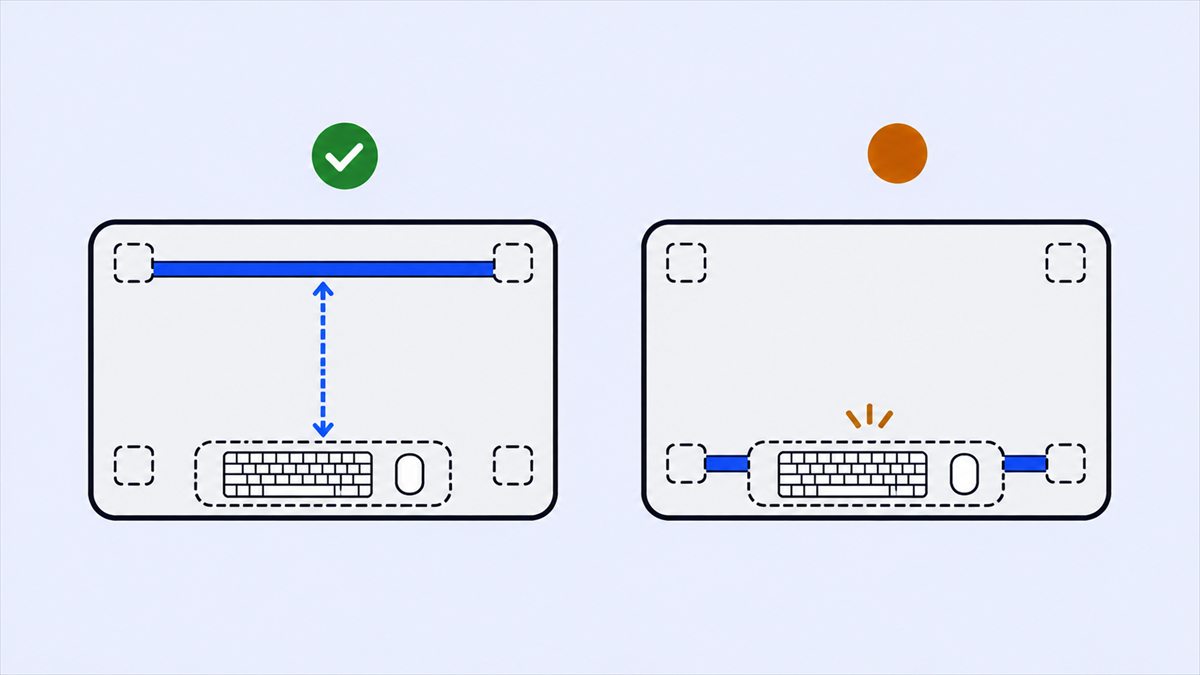
| HUANUO | Screws to the desk | Over 0.6 in | No crossbar within 14.17 in of the desk edge; no legs or obstacles at the sides |
| StarTech | Clamps, tightened by hand | Up to 2.3 in | Each clamp uses 1.8 x 2.5 in of desk surface; the listing states no other limit |
| VIVO | Clamps | Up to 1.25 in | 32.5 in of desk width for the clamps; not for beveled edges |
| EUREKA | Screws to the desk | At least 0.59 in | Wood or MDF only; 34 x 15 in under the desk and 30 in from desktop to floor |
| Mount-It! | Clamps, no drilling | 0.39 to 1.49 in | About 31 in across the clamps; not for glass or beveled edges |
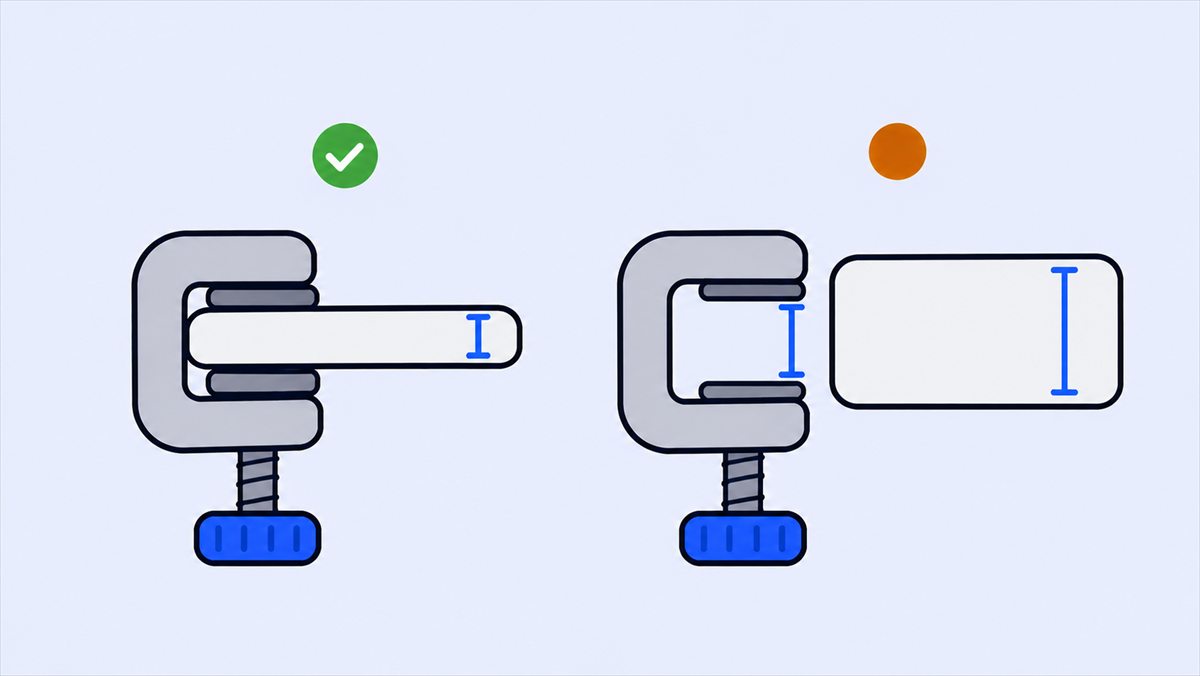
OSHA says a work surface should generally be no more than 2 inches thick. Of the clamp-on trays, only the StarTech states a limit above that, at 2.3 inches; the VIVO stops at 1.25 inches and the Mount-It! at 1.49. The two trays that screw in, the HUANUO and the EUREKA, state only a minimum thickness.
If you sit at a standing desk, our guide to anti-fatigue mats for a standing desk covers the floor, and our guide to monitor risers covers the screen height that goes with your keyboard height.
The five keyboard trays compared
Size, adjustment, desk thickness and capacity are as the seller’s Amazon listing states them; “not stated” means the listing gives no figure. Price bands are as of November 22, 2026 and change with sales. The tables around this one show the OSHA check, the desk fit and every figure side by side.
| Product | Size | Height and tilt | Desk thickness | Capacity | Price band | Link |
|---|---|---|---|---|---|---|
| HUANUO Under Desk Keyboard Tray, 25 x 9.8 Inch | 25 x 9.84 in | Height 6.3 in; tilt 6° up, 22° down | Over 0.6 in (screws) | Not stated | $50–$100 | Check price on Amazon (opens in a new tab) |
| StarTech Under-Desk Keyboard Tray, Clamp-On (KEYBOARD-TRAY-CLAMP1) | 27.5 x 12.2 in | Three heights (3.9, 4.7, 5.5 in); tilt not stated | Up to 2.3 in (clamps) | 26.5 lb | $50–$100 | Check price on Amazon (opens in a new tab) |
| VIVO Clamp-On Keyboard and Mouse Tray, 27 x 11 Inch (MOUNT-KB05E) | 26.8 x 11 in | None stated | Up to 1.25 in; not beveled | 11 lb | Under $50 | Check price on Amazon (opens in a new tab) |
| EUREKA ERGONOMIC Adjustable Keyboard Tray Under Desk (28 x 11, Black) | 27.95 x 11.82 in | Height by bracket holes; tilt not stated | At least 0.59 in; wood or MDF only | 30 lb | $50–$100 | Check price on Amazon (opens in a new tab) |
| Mount-It! Clamp-On Under Desk Keyboard Tray, No-Drill (26.4 x 11.8) | 26.4 x 11.8 in | None stated | 0.39–1.49 in; not glass or beveled | 4.4 lb | $50–$100 | Check price on Amazon (opens in a new tab) |
What each listing states, side by side
This table shows the figures that decide a purchase. “Not stated” means the listing gives no figure.
| Tray | Size | Capacity | Mounting | Warranty |
|---|---|---|---|---|
| HUANUO | 25 x 9.84 in | Not stated | Screws | 5 years (HUANUO’s site banner) |
| StarTech | 27.5 x 12.2 in (27.6 x 12.2 in on StarTech’s page) | 26.5 lb | Clamps | 2 years (StarTech’s page) |
| VIVO | 26.8 x 11 in (32.5 in with clamps) | 11 lb | Clamps | 3 years (VIVO’s page) |
| EUREKA | 27.95 x 11.82 in | 30 lb | Screws | Not stated |
| Mount-It! | 26.4 x 11.8 in (about 31 in across the clamps) | 4.4 lb | Clamps, no drilling | Lifetime, terms not given |
Two figures to read carefully. A listing’s capacity is the seller’s rating for the platform, with no independent test. And the five capacities run from 4.4 to 30 pounds, so check what you plan to put on the tray, including a wrist rest or a heavy mouse.
HUANUO Under Desk Keyboard Tray, 25 x 9.8 Inch: the only one with height and tilt stated
Size: 25 x 9.84 inHeight: 6.3 in adjustmentTilt: 6° up, 22° downDesk: Over 0.6 in, screw mountPrice band: $50–$100
The seller’s Amazon listing says this HUANUO tray is 25 by 9.84 inches with a wrist rest, swivels 180 degrees left and right, adjusts 6.3 inches in height and tilts 6 degrees up and 22 degrees down. It says the platform fits keyboards up to 17.3 by 5.5 inches plus mouse space, weighs 10 pounds, screws under the desk, and needs a desk more than 0.6 inch thick.
The listing gives a clearance check: no crossbar, or 14.17 inches from the desk edge to the crossbar (16.22 inches for the tray to slide fully under), and no legs or obstacles on either side. It does not state a weight capacity or a warranty. HUANUO’s own site banner lists a 5-year warranty and 30-day returns, and its page showed the model as sold out on November 22, 2026.
Pros
- The only listing that states both height (6.3 inches) and tilt (6 degrees up, 22 down) adjustment
- Swivels 180 degrees and includes a wrist rest, per the listing
- The listing gives a clear fit check: 14.17 inches from the desk edge to any crossbar
- A 5-year warranty stated in HUANUO’s site banner
Cons
- No weight capacity is stated on the listing
- Screws into the desk, so it needs more than 0.6 inch of desk thickness and a drill
- Needs 14.17 inches to the nearest crossbar, and 16.22 inches to slide fully under
- Sold out on HUANUO’s own page on November 22, 2026
Who should skip it
Skip it if your desk has a crossbar within 14 inches of the edge, if you need a stated weight capacity, or if you do not want to drill into the desk.
What the sources say
The seller’s listing is the source for this tray. Nerdtechy’s February 2023 roundup gives the HUANUO tray as 25 inches wide and 9.8 inches deep, the same as this listing, while Finding Dulcinea’s roundup lists a different HUANUO tray at 26.5 by 11.8 inches, so check the size before you buy. We found no independent test of this tray.
StarTech Under-Desk Keyboard Tray, Clamp-On (KEYBOARD-TRAY-CLAMP1): three heights, desks up to 2.3 inches
Size: 27.5 x 12.2 inHeight: Three settings: 3.9, 4.7, 5.5 inDesk: Up to 2.3 in, clampsCapacity: 26.5 lbPrice band: $50–$100
The seller’s Amazon listing says this StarTech tray is 27.5 by 12.2 inches, sits at one of three heights (3.9, 4.7 or 5.5 inches from the desk surface to the tray), holds up to 26.5 pounds, and extends 8.5 inches from the desk edge on sliding rails. The hand-tightened clamps fit desks up to 2.3 inches thick, take 1.8 by 2.5 inches of desk surface each, and have anti-slip pads. The front edge is curved and the back has a 0.15 inch lip.
The listing does not state a tilt adjustment or a warranty. StarTech’s own page for the tray gives a 2-year warranty, a weight of 5.6 pounds and plastic and steel construction, and its size as 27.6 by 12.2 inches.
Pros
- Clamps onto desks up to 2.3 inches thick, the thickest limit of the five
- A stated 26.5 pound capacity
- Three stated heights
- A 2-year warranty on StarTech’s page
Cons
- No tilt adjustment is stated
- The three heights are fixed steps, not a continuous range
- The clamps use 1.8 by 2.5 inches of desk surface each
- The listing does not say whether it fits beveled edges
Who should skip it
Skip it if you need a tilt adjustment, or if you want a tray that screws in instead of clamping on.
What the sources say
The seller’s listing is the source for this tray, with StarTech’s own page for the warranty, weight and material. StarTech sells other under-desk trays, so match the model number KEYBOARD-TRAY-CLAMP1. We found no independent test of this tray.
VIVO Clamp-On Keyboard and Mouse Tray, 27 x 11 Inch (MOUNT-KB05E): fixed slider, under $50
Size: 26.8 x 11 in (32.5 in with clamps)Height and tilt: None statedDesk: Up to 1.25 in, not beveled edgesCapacity: 11 lbPrice band: Under $50
The seller’s Amazon listing says this VIVO tray is 26.8 by 11 inches (32.5 inches including the clamps), slides out 8.5 inches from the desk edge and holds up to 11 pounds. It says the C-clamps fit desks up to 1.25 inches thick, that you need 32.5 inches of desk width for them, and that the tray is not compatible with desktops that have beveled edges.
The listing does not state a height or tilt adjustment. VIVO’s own page for the tray says the platform sits 1.5 to 2.75 inches below the desk surface, lists a 3-year warranty and a 30-day return policy, and gives the desk range as 0.5 to 1.25 inches.
Pros
- The lowest price band of the five, under $50 as of November 22, 2026
- A stated 11 pound capacity
- A 3-year warranty on VIVO’s page
- Clear fit limits: desks to 1.25 inches, no beveled edges, 32.5 inches of desk width
Cons
- No height or tilt adjustment is stated
- Only desks up to 1.25 inches thick, and not beveled edges
- Needs 32.5 inches of desk width for the clamps
- The listing title says 27 inches and its description says 26.8
Who should skip it
Skip it if you need to adjust the height or tilt, if your desk is thicker than 1.25 inches, or if its edges are beveled.
What the sources say
The seller’s listing is the source for this tray, with VIVO’s own page for the warranty, the drop below the desk and the desk range. Finding Dulcinea’s roundup lists the MOUNT-KB05E at 27 by 11 inches; VIVO’s page gives 26.8 inches (32.5 inches with the clamps). We found no independent test of this tray.
EUREKA ERGONOMIC Adjustable Keyboard Tray Under Desk (28 x 11, Black): highest capacity, wood desks only
Size: 27.95 x 11.82 inHeight: Adjusts through bracket holesDesk: At least 0.59 in; wood or MDFCapacity: 30 lbPrice band: $50–$100
The seller’s Amazon listing says this EUREKA tray is a wooden pull-out platform of 27.95 by 11.82 inches that holds up to 30 pounds on metal brackets, with sliding rails and a bracket with adjustable holes for height and position. It screws into the desk, which should be wood, MDF or a similar material and at least 0.59 inch thick; it is not compatible with plastic, hollow core, stone or glass desks.
The listing gives a space check: 34 inches long by 15 inches wide of room under the desk, and at least 30 inches from the underside of the desktop to the floor. It does not state a tilt adjustment or a warranty.
Pros
- The highest capacity stated here, 30 pounds
- Height adjusts through bracket holes, per the listing
- The largest platform of the five, at 27.95 by 11.82 inches
- A stated space check: 34 by 15 inches under the desk and 30 inches from desktop to floor
Cons
- No tilt adjustment is stated
- Screws into the desk, and is not for plastic, hollow core, stone or glass desks
- The listing states no warranty
- EUREKA sells other trays with different limits, so check the model
Who should skip it
Skip it if your desk is glass, stone, plastic or hollow core, if you want a clamp-on tray, or if you want a tilt adjustment.
What the sources say
The seller’s listing is the source for this tray. EUREKA’s own page for a different tray, its multi-angle model (SKU ERK-AKB-02-V3), lists a 28.35 by 10.24 inch board, a 6.6 pound capacity, a 360 degree swivel and a 15 degree tilt, and Finding Dulcinea’s roundup gives a EUREKA tray a 43 degree tilt. Capacity, tilt and size differ by model, so use the figures for the tray you buy. We found no independent test of this tray.
Mount-It! Clamp-On Under Desk Keyboard Tray, No-Drill (26.4 x 11.8): no-drill clamp, lifetime warranty
Size: 26.4 x 11.8 in (31 in across the clamps)Height and tilt: None statedDesk: 0.39–1.49 in; not glass or beveledCapacity: 4.4 lbPrice band: $50–$100
The seller’s Amazon listing says this Mount-It! tray is a no-drill clamp-on platform of 26.4 by 11.8 inches on a clamp assembly about 31 inches across and 5.55 inches tall, that it slides out 8.9 inches, and that it is rated for 4.4 pounds. It says the clamp tightens by hand on desks 0.39 to 1.49 inches thick and is not compatible with glass desks or beveled edges.
The listing states a lifetime manufacturer warranty without giving its terms. It does not state a height or tilt adjustment.
Pros
- No drilling: the clamp tightens by hand and can be moved or removed
- Fits desks 0.39 to 1.49 inches thick
- A lifetime manufacturer warranty is stated (terms are not on the listing)
- The listing states the platform size, the clamp width, the height with the clamp and the slide-out distance
Cons
- The lowest capacity of the five, at 4.4 pounds
- No height or tilt adjustment is stated
- Not for glass desks or beveled edges
- Mount-It!’s own 30 by 11 inch clamp-on tray is rated 11 pounds, so check the model
Who should skip it
Skip it if you need to hold more than 4.4 pounds, if you need to adjust height or tilt, or if your desk is glass or has beveled edges.
What the sources say
The seller’s listing is the source for this tray. Mount-It!’s own page for its 30 by 11 inch clamp-on tray (SKU MI-7181), a different model, lists an 11 pound capacity and desks up to 1.77 inches, and warns that it may not clamp onto beveled edges, drawers or crossbars. We found no independent test of this tray.
Verdict
Choose by your desk first, then by what the tray adjusts. OSHA says a tray should be adjustable in height and tilt, and the HUANUO is the only listing that states both, at the cost of screws, a crossbar check and no stated capacity. If your desk is thick or you want a clamp, the StarTech states desks up to 2.3 inches, three heights and 26.5 pounds, and the EUREKA states 30 pounds and a height adjustment for wood or MDF desks. The VIVO is the lowest price and is fixed, and the Mount-It! is fixed with a 4.4 pound rating. We found no independent test of any tray, so every limit here is the seller’s or the maker’s own.
Where roundups and makers disagree
- Tilt. Finding Dulcinea’s roundup (byline April 8, 2026, under a “November 2026” title) gives a EUREKA tray a 43 degree vertical tilt. EUREKA’s own page for its multi-angle tray says 15 degrees.
- HUANUO sizes. Nerdtechy lists a HUANUO tray at 25 by 9.8 inches and Finding Dulcinea lists one at 26.5 by 11.8 inches. HUANUO sells more than one tray, so match the model.
- Keyboard height. BestReviews’ roundup (marked “Updated August 2021” under a “Nov. 2026” title) says to position the keyboard 4 to 6 inches beneath the desktop. It gives no source, and OSHA gives no such figure: it says to match the keyboard to your elbow height.
- VIVO width. The VIVO MOUNT-KB05E is listed at 27 by 11 inches on Amazon and in Finding Dulcinea’s roundup; VIVO’s page gives 26.8 inches, or 32.5 inches with the clamps.
More guides
- Best monitor risers for a desk: work out the height and check the weight.
- Ergonomic desk setup: the order to set up your chair, desk, keyboard and monitor in.
- Ideal monitor height and distance: the OSHA and CCOHS numbers and a tape-measure worksheet.
- All DeskConsensus guides: every guide in one place.
Frequently asked questions
Are keyboard trays ergonomic?
OSHA says a tray may be needed if the work surface or chair cannot be properly adjusted, and that it should be adjustable in height and tilt, give leg and foot clearance and have room for a keyboard and a mouse. CCOHS says no keyboard design is universally best and the goal is a neutral wrist position.
How high should my keyboard be?
OSHA says your elbows should be about the same height as the keyboard, with your forearms approximately parallel with the floor and your wrists straight. CCOHS says to keep your elbows at about 90 degrees (between 90 and 110).
Do I need a tray that tilts?
OSHA says the keyboard’s tilt may need to be raised or lowered to keep the wrists straight, depending on how you sit, and CCOHS names a tray that tilts as one way to raise the back or the front. Of the five listings here, only the HUANUO states a tilt adjustment.
How thick can my desk be?
It depends on the tray. The VIVO states up to 1.25 inches, the Mount-It! 0.39 to 1.49 inches, and the StarTech up to 2.3 inches. The HUANUO states more than 0.6 inch and the EUREKA at least 0.59 inch. OSHA says a work surface should generally be no more than 2 inches thick.
Can I use a clamp-on tray on a glass or beveled desk?
Check the listing. The VIVO says it is not compatible with beveled edges, the Mount-It! says it is not compatible with glass desks or beveled edges, and the EUREKA says it is not compatible with plastic, hollow core, stone or glass desks. The StarTech listing states no such limit.
Do I need a keyboard tray with a standing desk?
OSHA says a tray may be needed if the work surface or the chair cannot be properly adjusted. The page does not mention standing desks. The HUANUO listing describes its 6.3 inch height adjustment as moving from sitting to standing.
Which tray holds the most weight?
The EUREKA listing states 30 pounds and the StarTech 26.5 pounds, against 11 pounds for the VIVO and 4.4 pounds for the Mount-It!. The HUANUO listing states no capacity. These are the sellers’ ratings, with no independent test.
How we research
For this guide we used the seller’s Amazon listings for the HUANUO, StarTech, VIVO, EUREKA and Mount-It! trays; VIVO’s, StarTech’s and HUANUO’s own pages for warranties and fit limits; EUREKA’s and Mount-It!’s own pages for other models of theirs; OSHA’s Computer Workstations eTool page on keyboards; the CCOHS keyboard selection and use fact sheet (last revised February 28, 2022); and the roundups from Finding Dulcinea, Nerdtechy and BestReviews named above. We do not test products ourselves, we found no lab test of keyboard trays, and we do not use customer reviews, ratings or sale prices. Where a source gives no figure, the page says “not stated”. Price bands (under $50, $50–$100, $100–$200, over $200) were checked on November 22, 2026 and change with sales.
Written by