
Best Monitor Risers for a Desk: Work Out the Height and Check the Weight
Disclosure: As an Amazon Associate, we earn from qualifying purchases. This costs you nothing extra and does not change which products we pick. Read our disclosure.
A monitor riser lifts the screen so you do not have to look down at it. Two questions decide which one fits: how high it needs to be, and how much weight it is rated for. Sellers state both in different ways, and two of the six listings, for the OPNICE and the WESTREE, give a weight rating but not how much the riser lifts the screen, so this guide shows what each listing says before it says what we would pick.
We compare six risers, all in the under $50 price band as of November 21, 2026. OSHA, the US Occupational Safety and Health Administration, says the top line of the screen should be at or below eye level, and the guide turns that into a four-step measurement. We found no lab test of monitor risers, so every figure here comes from a maker’s page or a seller’s Amazon listing, and the guide says which.
How we researched this
We don’t test products ourselves, and we found no lab test of monitor risers. Specs come from HUANUO’s page for its U-Shaped Monitor Riser and its 3-Level Adjustable Monitor Riser page, and from the seller’s Amazon listing for all six risers. Screen placement comes from OSHA’s monitor page, a monitor’s weight example from Dell’s US page for the S2725H, and the usual height range from GameRevolution’s riser guide (updated April 2022). See the full method.
Quick answer
Measure first, then choose.
Work out the most lift you can use with the four steps below (lift is how far the riser raises the screen), so the top of the screen ends up at or below your eye level. If that comes to about 4 inches, the HUANUO steel riser is the one whose maker page states a 3.94 inch lift and a 44 pound rating. If you need more height or want to adjust it, the WALI lists settings of 4.5, 5.3 and 6.1 inches. The OPNICE (with a drawer) and the WESTREE (wide enough for two monitors) listings do not say how much they lift the screen, so you cannot check them against your eye-level measurement.
Jump to your situation
Best-documented specs
HUANUO Monitor Riser with Vented Steel Shelf
Steel, one fixed height of 3.94 inches and a 44 pound rating, all on the maker’s own page.
Price band: Under $50
Tallest stated heights
WALI Computer Monitor Stand for Desk (model PTT001-B)
Three settings of 4.5, 5.3 and 6.1 inches, the highest stated of the six, with a 44 pound rating on the seller’s listing; the shelf is plastic.
Price band: Under $50
Storage drawer
OPNICE 2-Tier Monitor Stand Riser with Drawer and 2 Pen Holders
A steel two-tier riser with a drawer and two pen holders; the listing states 44 pounds but not the lift.
Price band: Under $50
Work out how high your riser needs to be
OSHA says to put the monitor directly in front of you, at least 20 inches away, with the top line of the screen at or below eye level. It also says the center of the screen should normally be 15 to 20 degrees below horizontal eye level, and gives 20 to 40 inches as the preferred viewing distance. OSHA does not give a riser height. Editors give a general range: GameRevolution says most risers are between 3 and 6 inches tall, and the six here state lifts from 2.87 to 6.1 inches where they state one.
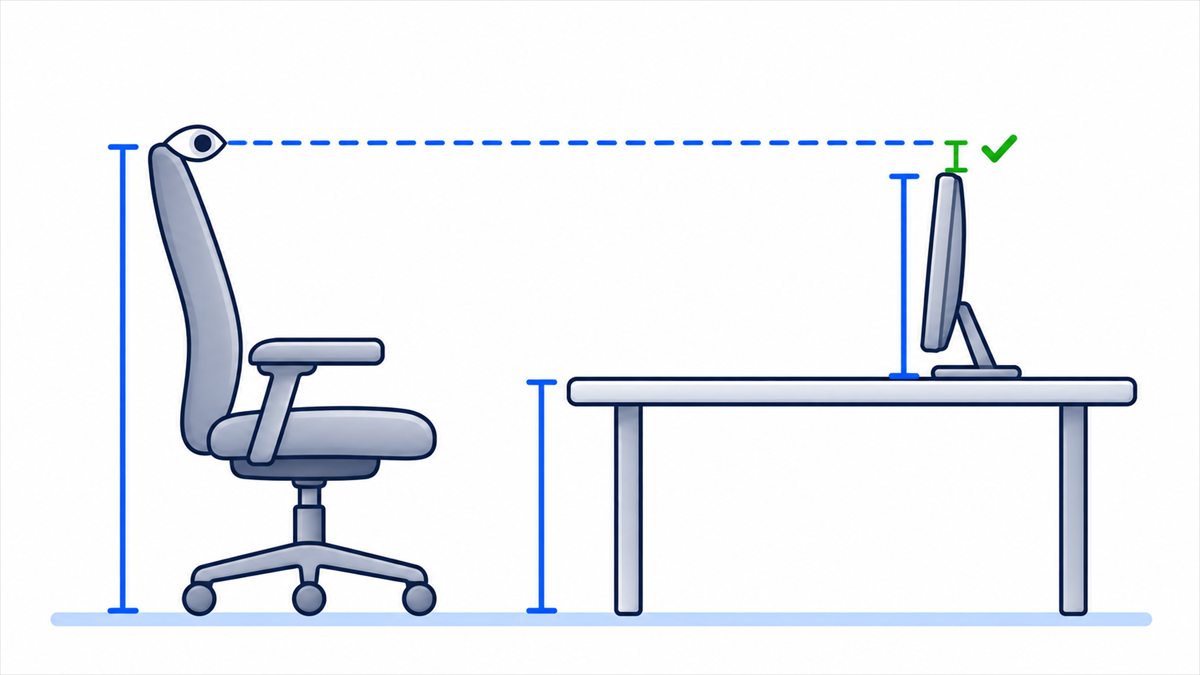
Because the rule is “at or below” eye level, your measurement gives the most lift you can use, not a target. Measure this way:
- Sit the way you normally work and measure from the floor to your eyes.
- Measure from the floor to the top of your desk.
- Measure from the desk to the top edge of the screen, with the monitor on its own stand and no riser.
- Subtract: eye height, minus desk height, minus the screen top above the desk. The answer is the most lift you can use.
| Example | Eye height | Desk height | Screen top above desk | Most lift |
|---|---|---|---|---|
| Example A | 42 in | 29 in | 15 in | None: the top is already above eye level |
| Example B | 46 in | 29 in | 15 in | 2 in |
| Example C | 50 in | 29 in | 15 in | 6 in |
These are made-up numbers to show the arithmetic; use your own. In example B the most lift is 2 inches, which is lower than the lowest stated setting of every riser here (the Amazon Basics goes down to 2.87 inches), so that person needs no riser or a thinner one. In example C the most lift is 6 inches: the WALI’s 5.3 inch setting fits, and its 6.1 inch setting would put the top of the screen 0.1 inch above eye level.
If the screen faces a window or a ceiling light, tilt and position matter as well as height; our guide on how to reduce glare on a computer monitor covers that.
Check the weight and the size before you buy
A riser’s weight rating is the most it is meant to carry, and everything on top counts. Monitor makers do not always list the weight with the stand. Dell’s US page for the 27 inch S2725H lists 9.48 pounds for the panel alone (Dell labels it the weight for mounting on a wall or arm) and 16.11 pounds with packaging, and gives no weight with the stand. On a riser the monitor sits on its own stand, so the true figure is a little above 9.48 pounds and below the boxed 16.11 pounds. Both are under the 22 pound rating of the Amazon Basics, the lowest-rated of the six, and well under 44 pounds.
Check these three things for your own monitor:
- Weight. Find “weight with stand” in your monitor’s manual or spec sheet. If only the panel weight is listed, use the boxed weight as an upper limit. Add anything else that will sit on the riser.
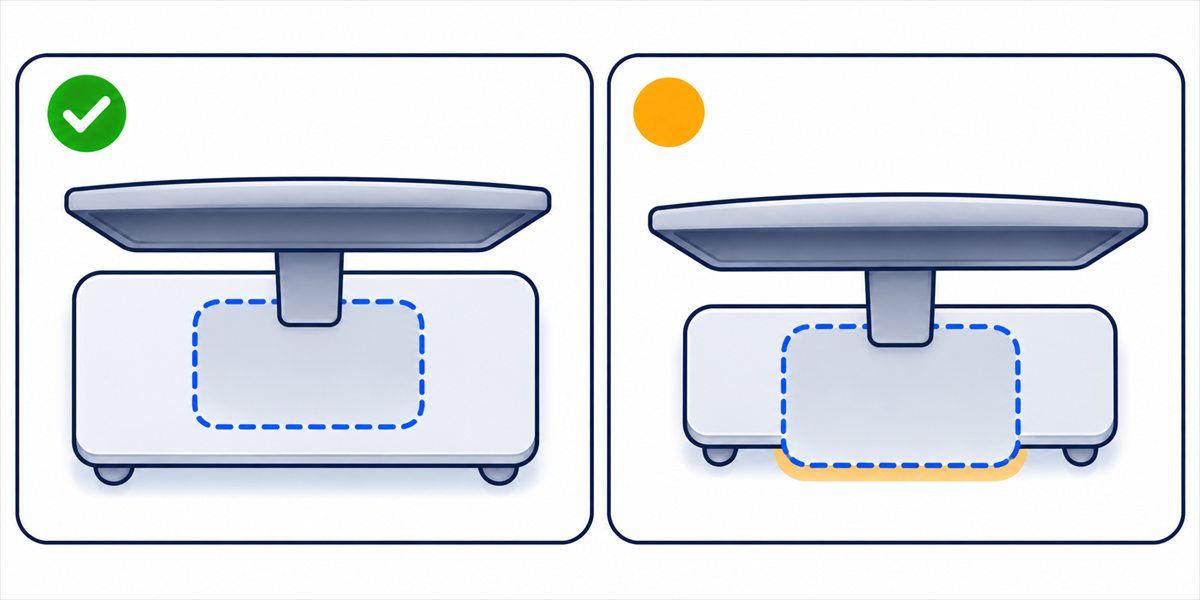
- Foot size. Measure the base of your monitor’s stand and compare it with the top. The tops are 14.57 by 9.25 inches (HUANUO, per the maker), 14.6 by 9.3 inches (WALI, per the listing) and about 11.6 by 11 inches at the center (Amazon Basics, per the listing). The OPNICE (20.5 by 9.5 inches) and WESTREE (35.8 by 10.2 inches) listings give overall sizes.
- Desk space. A wide riser such as the WESTREE needs a desk with room for its whole footprint, and the monitor still needs to be at least 20 inches from your eyes, per OSHA.
We found no independent load test of any monitor riser, so each rating here is the maker’s or the seller’s own figure.
The six monitor risers compared
Capacity, heights and sizes are as the maker or the seller’s Amazon listing states them, and “not stated” means that source gives no figure. Price bands are as of November 21, 2026. The table after the picks shows what each source does and does not say.
| Product | Made of | Holds up to | Raises the screen | Price band | Best for | Link |
|---|---|---|---|---|---|---|
| HUANUO Monitor Riser with Vented Steel Shelf | Steel with a baked-on paint finish | 44 lb (maker and listing) | 3.94 in (maker) | Under $50 | A fixed lift of about 4 inches | Check price on Amazon (opens in a new tab) |
| HUANUO 3-Height Adjustable Monitor Riser | Steel, hard plastic and rubber feet | 44 lb (listing) | Three heights, up to 5.51 in (maker) | Under $50 | Fine-tuning the height | Check price on Amazon (opens in a new tab) |
| WALI Computer Monitor Stand for Desk (model PTT001-B) | Plastic shelf | 44 lb (listing) | 4.5, 5.3 or 6.1 in (listing) | Under $50 | The most height, with three settings | Check price on Amazon (opens in a new tab) |
| Amazon Basics Height Adjustable Monitor Stand Riser (3-level) | ABS plastic (a light, hard plastic) | 22 lb (listing) | 2.87, 4.2 or 4.8 in (listing) | Under $50 | A small lift for a light monitor | Check price on Amazon (opens in a new tab) |
| OPNICE 2-Tier Monitor Stand Riser with Drawer and 2 Pen Holders | Carbon steel with a baked-on paint finish | 44 lb (listing) | Not stated in the listing | Under $50 | Storage under the screen | Check price on Amazon (opens in a new tab) |
| WESTREE Dual Monitor Stand Riser, Wood and Steel | Steel frame with a wood-look top | 68 kg, about 150 lb (listing) | Not stated in the listing | Under $50 | Two monitors side by side | Check price on Amazon (opens in a new tab) |
What each source states and does not state
This table shows the figures that decide a purchase. “Not stated” means we found no figure in the maker’s page or the seller’s Amazon listing.
| Riser | Holds up to | Raises the screen | Size | Warranty |
|---|---|---|---|---|
| HUANUO steel | 44 lb (maker page and listing) | 3.94 in (maker page) | 14.57 x 9.25 x 3.94 in (maker page) | “Up to 5-year warranty” on the maker’s page, terms not given there |
| HUANUO 3-height | 44 lb (listing); not on the maker’s page | Three levels; 5.51 in is the tallest size on the maker’s page; lower settings not stated | 14.57 x 9.25 x 5.51 in (maker page) | “Up to 5-year warranty” on the maker’s page, terms not given there |
| WALI (PTT001-B) | 44 lb (listing) | 4.5, 5.3 or 6.1 in (listing) | 14.6 x 9.3 in shelf (listing) | Not stated |
| Amazon Basics | 22 lb (listing) | 2.87, 4.2 or 4.8 in (listing) | 16.1 x 11 x 4.88 in item size; top about 11.6 x 11 in (listing) | Not stated |
| OPNICE | 44 lb (listing) | Not stated | 20.5 x 9.5 x 6.3 in overall (listing) | Not stated; 100-day return period |
| WESTREE | 68 kg, about 150 lb (listing) | Not stated | 35.8 x 10.2 x 4.92 in overall (listing) | Not stated |
Two figures in these listings are easy to misread. The Amazon Basics “16.1 inch” size is the base: its own listing says the top is about 11.6 inches wide at the center. And the OPNICE and WESTREE sizes are overall sizes, so their heights (6.3 and 4.92 inches) are not necessarily how much they lift a monitor.
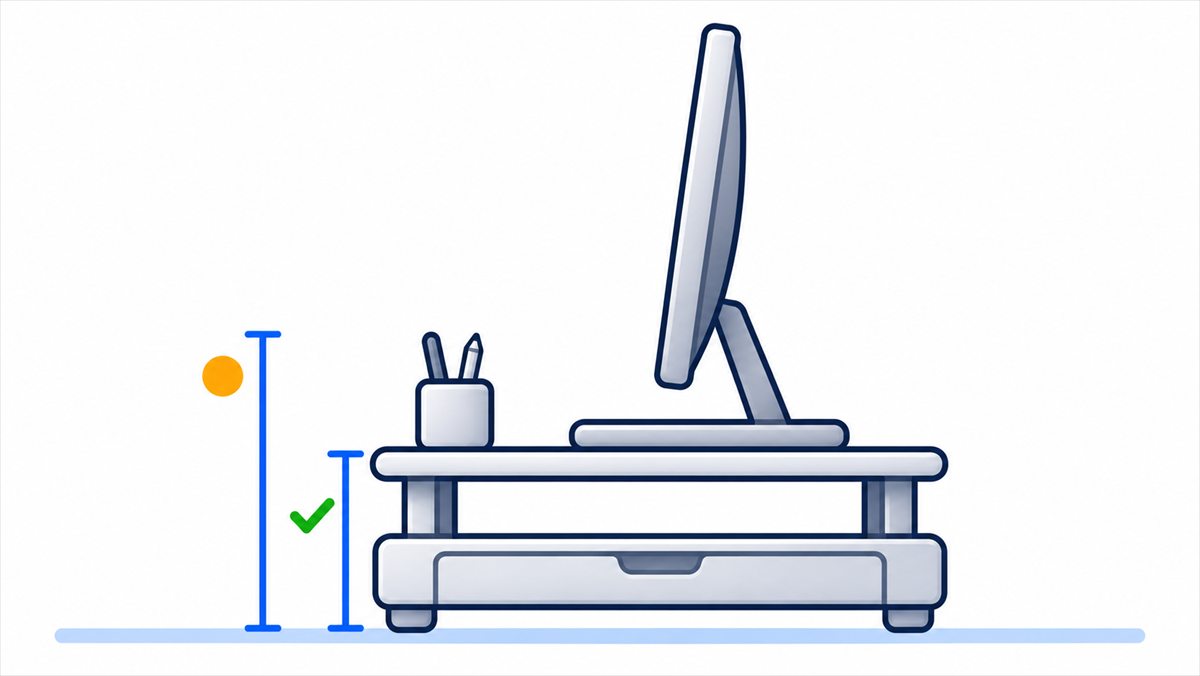
HUANUO Monitor Riser with Vented Steel Shelf: steel, one fixed height
Made of: Steel with a baked-on paint finish (maker)Holds up to: 44 lb (maker and listing)Raises the screen: 3.94 in (maker)Size: 14.57 x 9.25 x 3.94 in (maker)Price band: Under $50
HUANUO’s own page for its U-Shaped Monitor Riser (model HNLL2) says it is made of steel with a baked-on paint finish and perforated holes for airflow, measures 14.57 by 9.25 by 3.94 inches, raises the monitor 3.94 inches, and holds up to 44 pounds. It has one height, the legs are screwed on during assembly, and the page gives its weight as 1.38 pounds. The seller’s Amazon listing for this riser also states a 44 pound load rating.
Pros
- The maker’s page and the seller’s listing agree on the 44 pound rating
- The maker states the lift (3.94 inches) and the size
- Steel construction with a vented top, per the maker
- Light at 1.38 pounds, per the maker
Cons
- One fixed height: a lift that is too high or too low cannot be changed
- No drawer or compartments, only open space underneath
- The page says “up to 5-year warranty” but does not say what the warranty covers
- No independent test of its load rating
Who should skip it
Skip it if your measurement says you need less or more than 3.94 inches, or if you want to change the height later.
What the sources say
HUANUO’s page lists the riser at 3.94 inches and 44 pounds and describes the shelf as steel with perforated holes. Its banner says “up to 5-year warranty” without naming the terms. We found no editor or lab that measured this riser’s load rating, so the 44 pounds is the maker’s and the seller’s figure.
HUANUO 3-Height Adjustable Monitor Riser: three heights, steel and plastic
Made of: Alloy steel, polycarbonate (a hard plastic) and rubber (maker)Holds up to: 44 lb (listing); the maker’s page gives no numberRaises the screen: Three levels, up to 5.51 in (maker)Size: 14.57 x 9.25 x 5.51 in (maker)Price band: Under $50
HUANUO’s page for its 3-Level Adjustable Monitor Riser lists alloy steel, polycarbonate and rubber, three levels, leg assembly, a weight of 1.79 pounds and a size of 14.57 by 9.25 by 5.51 inches. The seller’s Amazon listing states a 44 pound load rating; the maker’s page describes the stand as holding heavy monitors but gives no weight figure. The page lists the tallest size (5.51 inches) and not the lower two settings.
Pros
- Three height settings, per the maker and the listing title
- The listing states a 44 pound load rating
- The maker gives the size and the weight (1.79 pounds)
- Airflow vents, per the listing title
Cons
- The maker’s page gives no weight rating, only the listing does
- The two lower height settings are not stated on the maker’s page
- The top is partly plastic (polycarbonate), per the maker
- No independent test of its load rating
Who should skip it
Skip it if you want a maker-stated rating for every setting, or if you want an all-steel top.
What the sources say
HUANUO’s page says “up to 5-year warranty” and describes the stand as reinforced steel that “holds heavy monitors with ease” without a number. The seller’s Amazon listing supplies the 44 pound rating. We found no editor or lab that measured this riser.
WALI Computer Monitor Stand for Desk (model PTT001-B): tallest height settings, plastic shelf
Made of: Plastic shelf (listing)Holds up to: 44 lb (listing)Raises the screen: 4.5, 5.3 or 6.1 in (listing)Size: 14.6 x 9.3 in shelf (listing)Price band: Under $50
The seller’s Amazon listing says this WALI riser has a plastic shelf of 14.6 by 9.3 inches with vent holes, holds up to 44 pounds (20 kg), and raises a monitor 4.5, 5.3 or 6.1 inches off the desk. It says rubber pads keep it from slipping or marking the desk and that no tools are needed to assemble it. The listing does not state a warranty or the stand’s own weight.
Pros
- Three height settings, up to 6.1 inches, the tallest stated of the six
- Stated 44 pound rating
- No tools needed to assemble, per the listing
- Rubber pads to protect the desk, per the listing
Cons
- The shelf is plastic, so the 44 pound rating is the seller’s figure for a plastic shelf, with no independent test
- The lowest setting is 4.5 inches, so it does not suit a small lift
- No warranty is stated in the listing
- The stand’s own weight is not stated
Who should skip it
Skip it if you need less than 4.5 inches of lift, if you want a metal shelf, or if you want a stated warranty.
What the sources say
The seller’s listing is the only source we read for this model (PTT001-B). It describes the shelf as plastic and states 44 pounds, 4.5, 5.3 and 6.1 inches and 14.6 by 9.3 inches. We found no maker page and no independent test of this model.
Amazon Basics Height Adjustable Monitor Stand Riser (3-level): lowest setting, light plastic
Made of: ABS plastic (a light, hard plastic) (listing)Holds up to: 22 lb (listing)Raises the screen: 2.87, 4.2 or 4.8 in (listing)Size: Base 16.1 x 11 in; top about 11.6 x 11 in at the center (listing)Price band: Under $50
The seller’s Amazon listing says this stand is ABS plastic, supports up to 22 pounds, and has detachable legs that give heights of 2.87, 4.2 and 4.8 inches. It lists the item size as 16.1 by 11 by 4.88 inches and the weight as 2.6 pounds, and says the top surface is about 11.6 by 11 inches at the center and narrower at the sides. It says it has non-skid feet. The listing does not state a warranty.
Pros
- The lowest stated setting of the six: 2.87 inches
- The listing says plainly that the top tapers and gives its width at the center
- Light at 2.6 pounds, per the listing
- Three height settings with detachable legs, per the listing
Cons
- The lowest weight rating of the six: 22 pounds
- The top is narrower than the 16.1 inch base
- Plastic, so it is the one to check first if your monitor or anything else on it is heavy
- No warranty is stated in the listing
Who should skip it
Skip it if your monitor is heavy, if you want to put a printer or a second item on it, or if you want the wider top that a 16 inch base suggests.
What the sources say
The seller’s listing is the only source we read for this riser. It gives the item size as 16.1 by 11 inches and says the usable top is about 11.6 by 11 inches, so the larger figure is the base. We found no maker page beyond the listing and no independent test.
OPNICE 2-Tier Monitor Stand Riser with Drawer and 2 Pen Holders: drawer storage, steel
Made of: Carbon steel with a baked-on paint finish (listing)Holds up to: 44 lb (listing)Raises the screen: Not stated in the listingSize: 20.5 x 9.5 x 6.3 in overall (listing)Price band: Under $50
The seller’s Amazon listing says this two-tier riser is carbon steel with a baked-on paint finish, comes with a drawer and two hanging pen holders, and measures 20.5 by 9.5 by 6.3 inches overall and has a load capacity of 44 pounds. It says four non-slip pads are height-adjustable and gives a 100-day return period. The listing states no range for how much it lifts a monitor, no warranty and no weight for the stand.
Pros
- A drawer and two pen holders for small desk items, per the listing
- A stated 44 pound load capacity, per the listing
- A wide top of 20.5 inches overall, per the listing
- A 100-day return period, per the listing (a return period is not a warranty)
Cons
- The 44 pound rating is the seller’s figure, with no independent test
- The lift is not stated: 6.3 inches is the overall height of the unit, not necessarily how high it raises a monitor
- No warranty is stated in the listing
Who should skip it
Skip it if you need to know the exact lift for your eye-level measurement, or if you want a stated warranty.
What the sources say
The seller’s listing is the only source we read for this riser. It states a 44 pound load capacity and no lift. The overall size of 20.5 by 9.5 by 6.3 inches includes the drawer and pen holders, so do not use 6.3 inches as the lift. Ask the seller how much it raises a monitor.
WESTREE Dual Monitor Stand Riser, Wood and Steel: wide shelf for two monitors
Made of: Alloy steel frame with a wood-finish top (listing)Holds up to: 68 kg, about 150 lb (listing)Raises the screen: Not stated in the listingSize: 35.8 x 10.2 x 4.92 in overall (listing)Weight: 4.09 kg, about 9 lb (listing)Price band: Under $50
The seller’s Amazon listing says this stand is alloy steel in a rustic brown wood finish, is made for two monitors, and measures 35.8 by 10.2 by 4.92 inches overall and weighs 4.09 kilograms (about 9 pounds). It says the legs are thick solid steel and that anti-slip pads can be installed. The listing states a load capacity of 68 kilograms (about 150 pounds) but no lift and no warranty, and says tools and parts are included.
Pros
- A 35.8 inch top, wide enough for two monitors side by side, per the listing
- Steel legs and a wood-finish top, per the listing
- A stated load capacity of 68 kg (about 150 lb), per the listing
- The listing gives the stand’s own weight (4.09 kg)
Cons
- The 68 kg rating is the seller’s figure, with no independent test
- The lift is not stated: 4.92 inches is the overall height, which may include the thickness of the top
- Needs a desk with room for a 35.8 by 10.2 inch footprint
- No warranty is stated in the listing
Who should skip it
Skip it if you use one monitor, if your desk is narrow, or if you need to know the exact lift for your eye-level measurement.
What the sources say
The seller’s listing is the only source we read for this riser. It calls the product a stand for two monitors and states 68 kilograms (about 150 pounds): add up the weights of both monitors and compare. The listing gives no lift, so ask the seller how much it raises a monitor.
Verdict
There is no single best monitor riser, because the right height depends on your own measurements. Work out the most lift you can use first. If that is about 4 inches, the HUANUO steel riser is the one whose maker states both the lift (3.94 inches) and the weight rating (44 pounds). For more height, the WALI offers 4.5, 5.3 and 6.1 inches on a plastic shelf, and for a small lift the Amazon Basics goes down to 2.87 inches but is rated for only 22 pounds. The OPNICE and WESTREE add storage and width and state 44 pounds and 68 kilograms (about 150 pounds), but their listings do not say how much they lift the screen, so confirm that with the seller. We found no lab test of any of these risers, so every rating here is the maker’s or the seller’s own figure.
When a riser is not the right tool
- If your lift is under about 3 inches, the stated settings here start at 2.87 inches (Amazon Basics), so you may need no riser at all, or a thinner one than any of these.
- If the lift you need is more than 6 inches, the tallest stated setting here is 6.1 inches (WALI). None of the six may reach it.
- If you need to know the exact lift, choose one that states it: the HUANUO steel riser (3.94 inches), the WALI or the Amazon Basics (their settings). The OPNICE and WESTREE listings do not say how much they lift a monitor, so ask the seller first.
This guide covers risers that sit on the desk under the monitor’s own stand. It does not cover monitor arms, which hold the screen on a bracket.
More guides
- How to reduce glare on a computer monitor: screen position and lighting.
- Ergonomic desk setup: the order to set up your chair, desk, keyboard and monitor in.
- Ideal monitor height and distance: the OSHA and CCOHS numbers and a tape-measure worksheet.
- All DeskConsensus guides: every guide in one place.
Frequently asked questions
How high should my monitor be?
OSHA says to put the monitor directly in front of you, at least 20 inches away, with the top line of the screen at or below eye level. Our guide to monitor height and distance gives the rest of OSHA’s numbers and a way to measure your own screen.
How tall should a monitor riser be?
It depends on your eye height, your desk height and how tall your monitor is. GameRevolution says most risers are between 3 and 6 inches. Measure first: eye height, minus desk height, minus the screen top above the desk, is the most lift you can use.
How do I know a riser will hold my monitor?
Compare the riser’s weight rating with your monitor’s weight with its stand, plus anything else on top. Dell’s US page for the S2725H lists 9.48 pounds for the panel alone and 16.11 pounds boxed, both under the 22 pound rating of the Amazon Basics, the lowest-rated of the six. We found no independent load test of any riser, so each rating is the maker’s or the seller’s own.
Is the height in the listing how much the riser lifts the screen?
Not always. The Amazon Basics listing gives 4.88 inches as the item height and 4.8 inches as its tallest setting, while the OPNICE (6.3 inches) and WESTREE (4.92 inches) listings give overall heights without saying how much they lift a monitor. HUANUO’s steel riser page states the lift (3.94 inches) separately.
What if a listing does not say how much the riser lifts the screen?
The OPNICE and WESTREE listings give an overall height but not the lift. Ask the seller how much the riser raises a monitor before you buy, and compare that with the most lift you can use.
What does “up to 5-year warranty” mean on HUANUO’s page?
HUANUO’s riser pages show the words “up to 5-year warranty” and do not say on the page what is covered or for which products. Read the warranty terms with the seller before you rely on it.
What is the difference between a monitor riser and a monitor arm?
A riser sits on the desk under the monitor’s own stand. A monitor arm holds the monitor on a bracket instead. This guide covers risers only.
How we research
For this guide we used HUANUO’s own pages for its U-Shaped Monitor Riser and its 3-Level Adjustable Monitor Riser, and the seller’s Amazon listings for all six risers. We also used OSHA’s computer workstations monitor page, Dell’s US page for the S2725H monitor and GameRevolution’s monitor riser guide (updated April 2022) for the usual height range. We do not test products ourselves, we found no lab test of monitor risers, and we do not use customer reviews, ratings or sale prices. Where a source gives no figure, the page says “not stated”. Price bands (under $50, $50–$100, $100–$200, over $200) were checked on November 21, 2026 and change with sales.
Written by