
How to Reduce Glare on a Computer Monitor: Window, Lamp and Screen Fixes (2026)
Glare on a monitor is light from a window or a lamp that either bounces off the screen into your eyes or shines straight at them. It is usually fixed by moving things, not by buying something.
This guide helps you work out which kind of glare you have, then goes through the fixes in order, from the free ones (where the screen faces, the blinds, the lamp) to the last resort, a glare filter. If the screen itself flickers rather than showing reflections, see our guide to fixing a flickering monitor.
How we researched this
We don’t test products or steps ourselves. The advice comes from OSHA’s workstation environment page and its monitor page, the American Optometric Association’s page on computer vision syndrome, BenQ’s guide to glare, and the brightness help pages from Microsoft and Apple. OSHA’s pages are guidance, not a legal standard. See the full method.
Quick answer
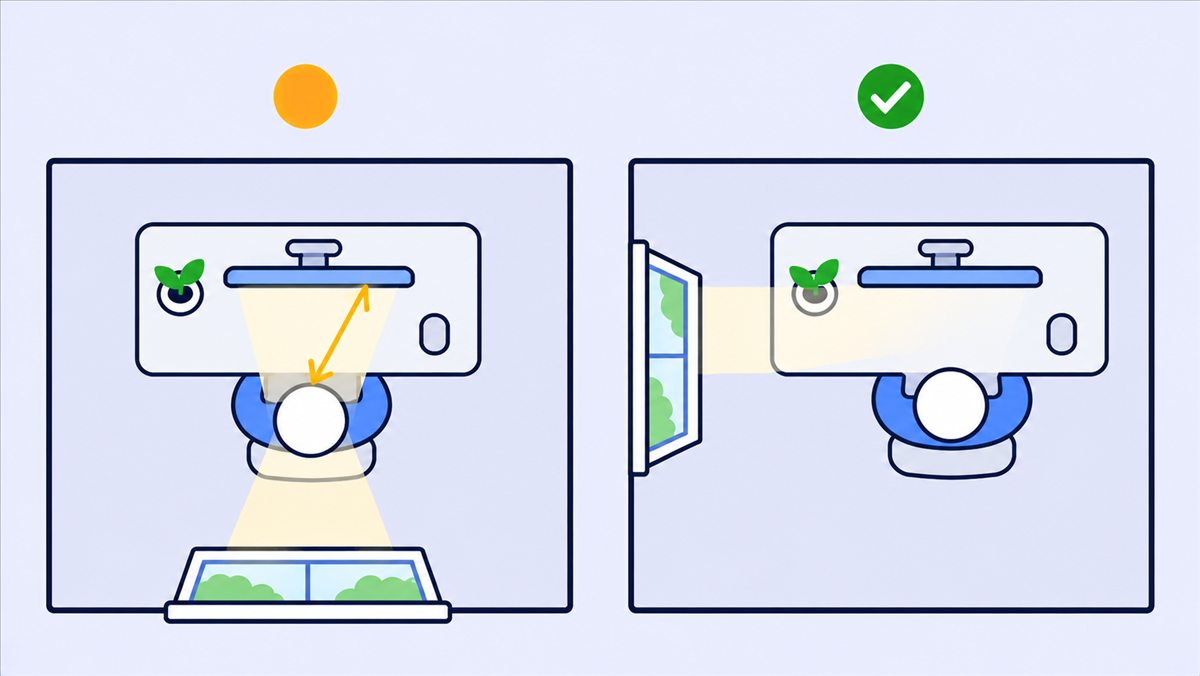
Start with where the screen faces. OSHA says to place the screen at right angles to windows and other light sources, cover windows with blinds or drapes, shield overhead lights, and position a desk lamp so its light does not reflect on the screen. The American Optometric Association says to position the screen to avoid glare, particularly from overhead lights or windows, and to consider a screen glare filter only if glare cannot be reduced another way. Wipe the screen too: OSHA says a layer of dust can add to glare.
Find out which kind of glare you have
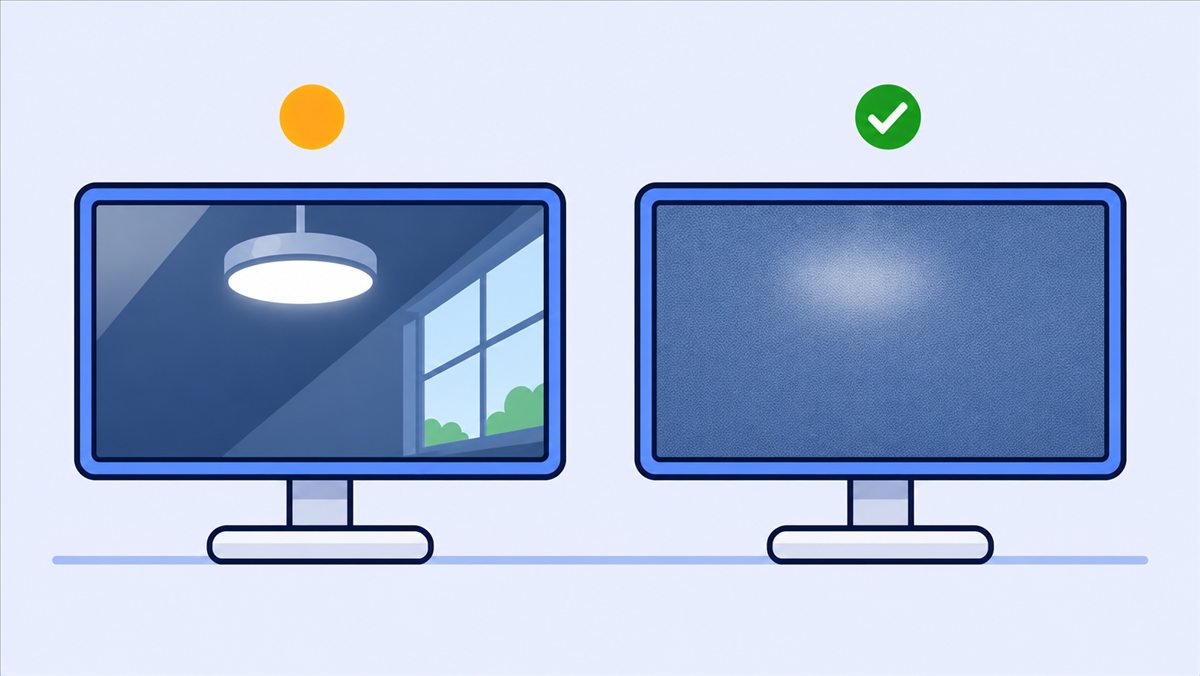
BenQ’s guide to glare names three kinds and says to identify which one you have before choosing a fix. A quick way to check for the second kind: look at the screen when it shows a dark page. If you can see a window, a lamp or the ceiling lights in it, that is reflected glare.
| Kind | What it looks like | What to do first | Source |
|---|---|---|---|
| Direct glare | A bright source is in your view: a bare bulb, a ceiling light, a sunny window beside the screen, a lamp at eye level | Move or shade the source, or turn your desk so it is out of your view | BenQ |
| Reflected glare | Light bounces off the screen, or off a glossy desk or paper, and you see lamps or windows in the picture | Turn the screen to right angles to the window, shade the window, aim lamps at the desk, not the screen | BenQ, OSHA |
| Contrast glare | The screen is much brighter than the room around it, which BenQ says is most noticeable in a dark room | Match the screen’s brightness to the room, or add a soft light behind the monitor | BenQ |
The American Optometric Association lists glare on a screen among several things that can cause eyestrain, headaches and blurred vision, along with poor lighting, viewing distance, posture and uncorrected vision. If the symptoms stay after you fix the glare, it recommends an eye exam.
Fixes, in order
- Turn the screen away from the window. OSHA says to place the face of the display at right angles to windows and light sources, and its monitor page says to place the monitor perpendicular to the window. That puts the window beside you, not behind the screen (which causes contrast problems) and not behind you (which reflects in the screen).
- Cover the window. OSHA and the American Optometric Association both say to use blinds or drapes. OSHA says to adjust them so light still enters the room but not your field of view, and it gives a rule for the type of blind: vertical for east and west windows, horizontal for north and south windows.
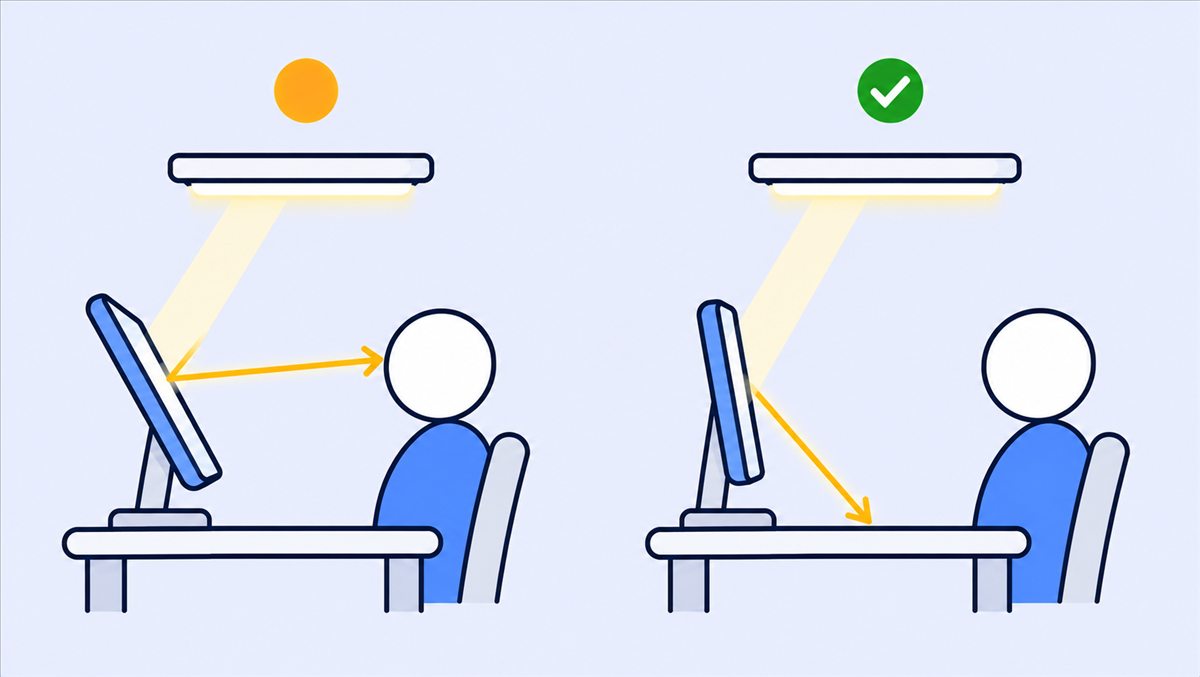
- Deal with the ceiling lights. OSHA says to use barriers or light diffusers on fixtures, to use indirect or shielded lighting where you can, and to keep rows of ceiling lights parallel to your line of sight, not across it.
- Aim lamps at the desk, not the screen. OSHA says to position a desk lamp so its light does not reflect on the screen, and to use lamps with glare shields or shades. BenQ says to aim the light forward and down onto the work surface, with the brightest part of the beam below eye level and away from the screen. The American Optometric Association adds that you can replace the bulbs in desk lamps with lower-wattage bulbs. Our guide to swing-arm and gooseneck lamps shows where to put one on a computer desk.
- Check the tilt. OSHA says to tilt the screen so it is perpendicular to your line of sight, usually no more than 10 to 20 degrees, and warns that tilting it back can create glare from ceiling lights. The American Optometric Association also gives 10 to 20 degrees. Change it a little at a time and watch for reflections. If the screen also sits too low, our guide to monitor risers shows how to work out the height you need.
- Set the brightness for the room. BenQ describes contrast glare as a screen that is much brighter than its surroundings, so brightness is the setting to try. In Windows, use the Brightness slider in Settings, System, Display; Microsoft notes that you might not see the slider on a desktop PC with an external monitor, in which case use the buttons on the monitor. On a Mac, use System Settings, Displays; Apple says the “Automatically adjust brightness” option appears only on Macs with an ambient light sensor.
- Clean the screen. OSHA says to clean the monitor frequently because a layer of dust can contribute to glare, and the American Optometric Association says keeping the screen clean and removing fingerprints can decrease glare.
- Add a filter or film last. The American Optometric Association says to consider a screen glare filter if there is no way to minimize glare from light sources. OSHA adds that a filter should not significantly decrease screen visibility. See the next section for the trade-offs.
Glare from a bright screen in a dark room is a different problem from window glare. If that is yours, see our guide to bias lighting for a monitor.
Glare filters, matte films and matte monitors
Both the American Optometric Association and OSHA treat a filter as a fallback. Lenovo’s knowledge base describes an anti-glare film as a treated surface that scatters light instead of reflecting it back, and BenQ describes the same idea for monitors: a matte panel spreads reflected light into a softer, broader haze, while a glossy panel gives a more concentrated reflection of the light source.
| Option | What it does | What to watch for | Source |
|---|---|---|---|
| Screen filter or film | Reduces the light reflected from the screen | Lenovo lists slightly softer text and images, possible changes in color and contrast, and a careful install to avoid bubbles or dust. OSHA says it should not significantly decrease visibility | American Optometric Association, OSHA, Lenovo |
| A matte monitor | The matte surface spreads reflections into a haze instead of a sharp image of the lamp or window | BenQ is a monitor maker, and its page is about its own matte panels. Its reflection figures are the maker’s own numbers, so we do not repeat them | BenQ |
| Room fixes (window, lamp, screen position) | Stop the light from reaching the screen at all | Free, and OSHA and the American Optometric Association list them before a filter | OSHA, American Optometric Association |
We do not recommend a specific filter or film here. The sources above describe how filters work and what to watch for, but none of them tests filters against each other.
Dark text on a light background?
OSHA’s page says dark characters on a light background are less affected by reflections. BenQ describes contrast glare as a bright screen in a dark room. Neither page tests dark mode, so we cannot say whether it helps or hurts glare. If your screen shows reflections in a bright room, try a light theme for that room and see if it helps.
More lighting guides
- Bias lighting for a monitor: if the screen looks too bright against a dark wall.
- Monitor light bars: a lamp that sits on top of the monitor and lights the desk, not the screen.
- Lighting for computer work: the order to set your lighting up in, with the light levels the safety sources give.
- All DeskConsensus guides: every guide in one place.
If you need a lamp
A lamp that is aimed at the desk is part of the fix OSHA describes. Our lamp guide covers five adjustable-arm lamps and where to put them.
How we research
For this guide we read OSHA’s computer workstations pages on the workstation environment and on monitors, the American Optometric Association’s page on computer vision syndrome, two BenQ knowledge center articles (on glare and on matte panels) and Lenovo’s knowledge base page on anti-glare screen protectors. For display brightness we used Microsoft’s and Apple’s help pages. We do not test products or steps ourselves. BenQ and Lenovo sell related products, so we use them only to describe how glare and filters work and not for their product claims. OSHA’s pages are guidance, not a legal standard. This guide does not cover blue light or night mode.
Frequently asked questions
What is the fastest way to reduce glare on a monitor?
Turn the screen so it is at right angles to the window, then close the blinds or drapes. OSHA gives that placement and the blinds advice first, and the American Optometric Association also lists blinds or drapes on windows.
Which way should my monitor face a window?
OSHA says to place the face of the display at right angles to windows and light sources, so the window is beside the screen. A window behind the screen causes contrast problems, and a window behind you reflects in the screen.
Should I tilt my monitor up or down?
OSHA says to tilt the screen so it is perpendicular to your line of sight, usually no more than 10 to 20 degrees, and warns that tilting it back can create glare from ceiling lights. The American Optometric Association also gives 10 to 20 degrees. Change it a little at a time and watch for reflections.
Can a desk lamp cause glare on a monitor?
Yes. OSHA says to position a desk lamp so its light does not reflect on the screen. BenQ says to aim the light forward and down onto the desk, with the brightest part of the beam below eye level.
Do anti-glare screen filters work?
The American Optometric Association says these filters decrease the amount of light reflected from the screen and to consider one if glare cannot be reduced another way. Lenovo lists trade-offs: slightly softer text and images and possible changes in color and contrast. None of the sources we used tests filters against each other, so we cannot say which work best.
Is a matte monitor better than a glossy one for glare?
BenQ says a matte panel spreads reflected light into a softer haze, while a glossy panel gives a more concentrated reflection of the light source. That is a maker’s description, not an independent comparison.
Does dark mode reduce glare?
We do not know. OSHA says dark characters on a light background are less affected by reflections, and BenQ says contrast glare comes from a bright screen in a dark room. Neither page tests dark mode.
Does cleaning the screen help with glare?
OSHA says to clean the monitor frequently because a layer of dust can contribute to glare. The American Optometric Association says keeping the screen clean and removing fingerprints can decrease glare.
When should I see an eye doctor?
The American Optometric Association says a comprehensive eye exam can diagnose digital eyestrain, and it lists uncorrected vision problems among the causes. If you still have headaches or eyestrain after you reduce the glare, an exam is the next step.
Written by