
Best USB Headsets for Work and Calls: USB-A and USB-C Picks (2026)
Disclosure: As an Amazon Associate, we earn from qualifying purchases. This costs you nothing extra and does not change which products we pick. Read our disclosure.
A USB headset plugs into a USB port and does its own sound conversion, so it works on a laptop with no headphone jack and does not depend on the computer’s audio jack. The catch is the plug: some are USB-A only, some are USB-C, and the right one depends on the ports on your computer.
This guide compares five USB headsets with a mic, shows which plug fits which computer, and says where the evidence is thin. We found independent tests from reviewers who bought their own units for four of the five, but none for the Logitech Zone 750, and the newest full test we found is from 2023.
How we researched this
We don’t test products ourselves. The headset comparisons come from TechGearLab’s computer headset test (July 2023; it says it buys every product it tests), SoundGuys’ Logitech H390 review (September 2023; SoundGuys purchased the unit). The rest come from RTINGS’ HyperX Cloud III review (September 2023, text updated May 2026), RTINGS’ JBL Quantum 400 review (July 2020, retested April 2022), Expert Reviews’ review of the earlier Logitech Zone Wired (September 2020), Logitech’s page for the Zone 750 and the Amazon listings. How USB audio works comes from SoundGuys’ explainer (updated January 2026). We found no head-to-head test of all five. See the full method.
Quick answer
For most calls, start with the HyperX Cloud III.
RTINGS found its mic keeps your voice clear and full-bodied with some background noise, and calls its fit very comfortable, though the sound lacks bass and it has no noise canceling. If you want to spend the least, the Logitech H390 has a decent mic, but SoundGuys and TechGearLab both found the fit hard to wear for long. Check the plug first: the H390 is USB-A only, and the Logitech Zone 750 is the one made for USB-C.
Jump to your situation
Best overall for calls
HyperX Cloud III Wired Gaming Headset
A mic that kept the voice clear with some background noise and a very comfortable fit, per RTINGS; no noise canceling.
Price band: $60–$100
Best low-cost over-ear
Logitech H390 Wired USB-A Headset
A decent mic and plug-and-play use, per SoundGuys; both testers found the fit hard to wear for long.
Price band: $15–$30
Best with one ear open
Callez Computer Headset (C500U3)
TechGearLab’s favorite: light, a clear mic and clip-on controls, with one ear left uncovered.
Price band: $15–$30
USB or 3.5 mm: what a USB headset changes
SoundGuys explains that USB audio moves the DAC and amp, the parts that turn digital audio into sound, from your computer into the headphones or a small adapter called a dongle, and that the USB Audio Class standard lets the device identify itself to the computer as an audio device. That is why a USB headset can work without the computer’s headphone jack, and why you pick it by the plug on the headset, not by the jack on your laptop.

If you already own a 3.5 mm headset and your laptop has no jack, a small USB adapter can be cheaper than a new headset: see our guide to USB audio adapters with a mic.
Which plug does your computer have?
Look at the ports on your computer. The big rectangular port is USB-A and the small oval one is USB-C. Many thin laptops have only USB-C.
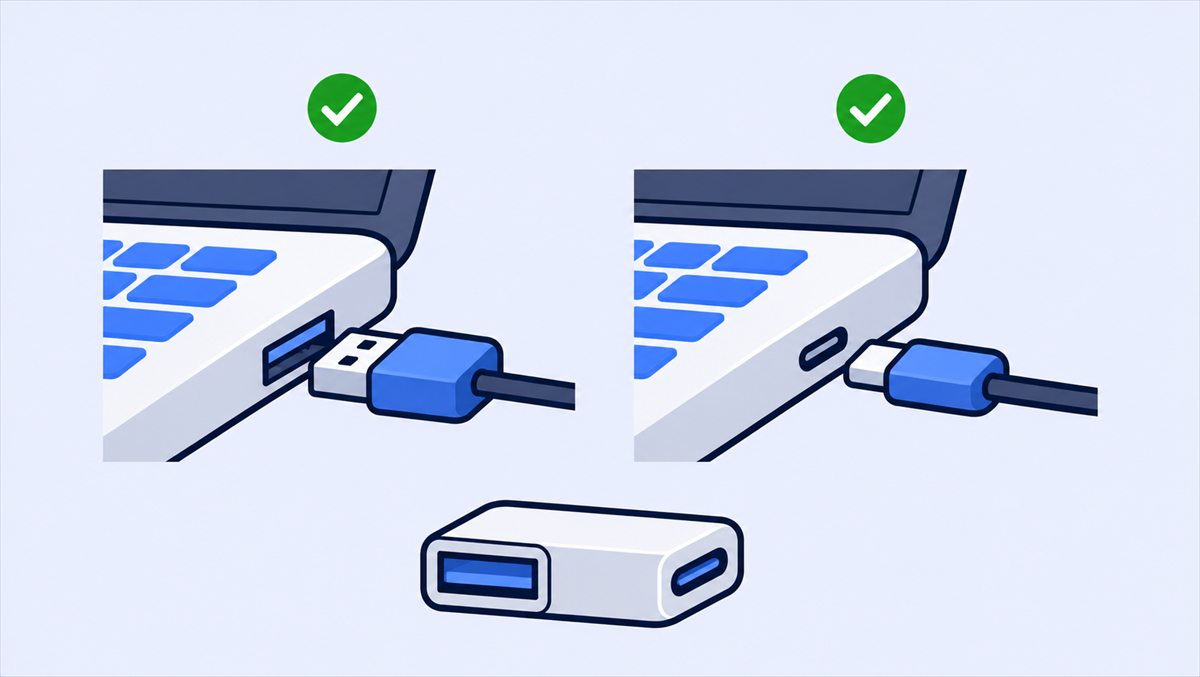
| Your computer has | Picks that plug in | What to check |
|---|---|---|
| A USB-A port | Logitech H390 (USB-A); HyperX Cloud III and JBL Quantum 400 (USB-A cables per the listing and RTINGS); Logitech Zone 750 with its included USB-A adapter | The Callez listing does not say which plug it has |
| Only USB-C ports | Logitech Zone 750 (USB-C, per Logitech); HyperX Cloud III (the listing says USB-C and USB-A) | The H390 and the JBL’s USB-A to USB-C cable need a USB-A port or an adapter |
| Only a 3.5 mm headphone jack | HyperX Cloud III and JBL Quantum 400 come with a 3.5 mm cable | RTINGS says the HyperX software settings do not apply over its analog cable |
Using a Chromebook? SoundGuys found the Logitech H390 plugs in and switches audio on a Chromebook. For more choices that work with a Chromebook, see our guide to headphones and earbuds for a Chromebook.
One ear or both ears?
Four of the five cover both ears. The Callez is mono: TechGearLab found it light, and it leaves one ear free to hear the room, but that ear is exposed to background noise. If you work somewhere loud, choose a both-ear headset; if you work alone and want to hear the door, a one-ear headset leaves that ear free and weighs less.

The five USB headsets compared
The plug and the ear design come from the listings and the reviews named in each section. Only the Logitech Zone 750 has no independent test of its own.
| Product | Connection | Ears | Price band | Best for | Link |
|---|---|---|---|---|---|
| HyperX Cloud III Wired Gaming Headset Start here | USB-C, USB-A and 3.5 mm (listing) | Both ears, over-ear | $60–$100 | A clear mic and a comfortable fit for long calls | Check price on Amazon (opens in a new tab) |
| Logitech H390 Wired USB-A Headset | USB-A | Both ears, on-ear | $15–$30 | Occasional calls on the lowest budget | Check price on Amazon (opens in a new tab) |
| Callez Computer Headset (C500U3) | USB (plug type not stated) | One ear (mono) | $15–$30 | Calls while hearing the room around you | Check price on Amazon (opens in a new tab) |
| Logitech Zone 750 Wired On-Ear Headset | USB-C, USB-A adapter included | Both ears, on-ear | $100–$150 | A work-style headset with a noise-canceling mic | Check price on Amazon (opens in a new tab) |
| JBL Quantum 400 Wired Over-Ear Gaming Headset | USB-A to USB-C cable and 3.5 mm | Both ears, over-ear | $100–$150 | A gaming-style headset with mic volume and sidetone in an app | Check price on Amazon (opens in a new tab) |
HyperX Cloud III Wired Gaming Headset: best overall pick for calls
Connection: USB-C, USB-A and 3.5 mm (Amazon listing)Mic: Detachable boom micPrice band: $60–$100
RTINGS (reviewed September 12, 2023, text updated May 4, 2026) describes the Cloud III as wired gaming headphones with a USB dongle that works with PCs and PlayStation, and a flexible boom mic that can be detached. It says the mic performs very well, so your voice sounds clear and full-bodied even with some noise in the background, and that the headphones are very sturdy and comfortable, with low latency over USB (little delay between your action and the sound). The Amazon listing says USB-C, USB-A and 3.5 mm connectivity. RTINGS found the default sound lacks bass, the soundstage (how wide and open the sound feels) is closed-off, and there is no noise canceling. It says the sound changes made in HyperX’s software apply over USB but not over the analog cable.
Pros
- The mic stays clear and full-bodied with some background noise, per RTINGS
- Very sturdy and comfortable, per RTINGS
- Low latency over USB, per RTINGS
- Graphic EQ and presets in HyperX’s software, per RTINGS
Cons
- The sound lacks bass, per RTINGS
- No noise canceling, per RTINGS
- It is a gaming headset: RTINGS reviews it for gaming, not for office use
- Software sound changes do not apply over the analog cable, per RTINGS
Who should skip it
Skip it if you work in a noisy room and want the headset to block sound, or if your employer requires a headset approved for your call app: RTINGS reviewed it as a gaming headset.
What the review says
RTINGS says it buys and tests every product it reviews. The review is from September 2023 and RTINGS changed some of its text in May 2026. RTINGS reviews it as a gaming headset, not a work headset.
Logitech H390 Wired USB-A Headset: best low-cost over-ear pick
Connection: USB-A, 1.9 m cableMic: Boom mic, in-line mutePrice band: $15–$30
SoundGuys (September 2023; it bought the unit and tested it for five days) found the H390 plug-and-play on a PC, Mac or Chromebook, loud enough to hear weak voices on a call, and its non-detachable boom mic decent for the price, with a large in-line mute button. It also found poor isolation, an on-ear fit that was stiff and sweaty, and a headache after about 90 minutes. TechGearLab (July 2023) found the sound outstanding and the headset foldable, but the fit tight, and the mic unusually loud.
Pros
- Plug-and-play on PC, Mac and Chromebook, per SoundGuys
- A decent mic for the price, per SoundGuys
- Folds up, with a light on the mute button, per TechGearLab
- Low price: it is in the same band as the Callez
Cons
- The fit is tight, per TechGearLab, and not comfortable after an hour, per SoundGuys
- Poor sound isolation, per SoundGuys
- The mic picks up keystrokes, mouse clicks and office noise, per SoundGuys
- USB-A only, per SoundGuys, and no way to adjust the mic level besides mute
Who should skip it
Skip it if you wear a headset for hours: SoundGuys got a headache after about 90 minutes and TechGearLab’s testers all found it tight. Also skip it if your laptop has only USB-C ports and you do not want to add an adapter.
What the reviewers say
TechGearLab says it buys every product it tests, and SoundGuys says it purchased this unit. Both tests are from 2023. SoundGuys found the sound alright for a cheap headset and TechGearLab called it outstanding; they did not test the same way, so we treat the sound as acceptable. Guide 33 also names this headset.
Callez Computer Headset (C500U3): best one-ear pick
Connection: USB (plug type not stated)Mic: Flexible mic, either earPrice band: $15–$30
TechGearLab (July 2023) named the Callez its favorite computer headset. It has in-line controls with buttons to mute the mic or the speaker and change the volume; the controls clip onto your shirt, and the mic rotates to either ear and bends into place. TechGearLab found the earphone sound clear and the mic reception excellent, with minimal background noise in its mic test. It warns that the one-sided design leaves one ear exposed to background noise and that the speaker side has no noise cancellation, so it is not the headset for a loud office or busy home.
Pros
- TechGearLab’s favorite computer headset, tested in 2023
- Light, per TechGearLab
- Clip-on controls for mute and volume, per TechGearLab
- Clear mic with minimal background noise in TechGearLab’s test
Cons
- One ear is always exposed to background noise, per TechGearLab
- No noise cancellation on the speaker side, per TechGearLab
- We found only one independent test, from 2023
- Neither TechGearLab nor the listing title says whether the plug is USB-A or USB-C
Who should skip it
Skip it if you work in a loud room, or if you want sound in both ears for music or video: TechGearLab says it is not for a busy office or loud household.
What the reviewer says
TechGearLab says it buys every product it tests. This is the only independent test of the Callez we found. It tested four headsets and the Callez was the favorite; the others were the New Bee, the Logitech H390 and a 3.5 mm-only headset.
Logitech Zone 750 Wired On-Ear Headset: best business-style pick
Connection: USB-C, USB-A adapter includedMic: Dual-mic, flip-to-mutePrice band: $100–$150
Logitech’s page says the Zone 750 has 40 mm drivers, passive noise cancellation (sound kept out by the ear cushions and fit, with no electronics) and a noise-canceling, flip-to-mute mic with dual-mic technology that isolates your voice. Logitech says its Logi Tune software lets you adjust the sidetone, the volume at which you hear your own voice. We found no independent test of the Zone 750 itself. Expert Reviews (September 2020) tested the earlier Logitech Zone Wired and found the mic clear on every call, with household chatter and moderate noise limited but loud typing not fully suppressed, and sound that leaks from the on-ear design. Logitech does not say the Zone 750 is the same headset.
Pros
- A noise-canceling, flip-to-mute dual mic, per Logitech
- Logi Tune software with sidetone, per Logitech
- USB-C with a USB-A adapter included, per Logitech
- The earlier Zone Wired had a clear mic and balanced sound, per Expert Reviews (2020)
Cons
- No independent test of the Zone 750 itself
- Costs more than the other four: $100–$150
- The on-ear design leaks sound, per Expert Reviews on the Zone Wired
- Logitech does not say the Zone 750 is the same headset Expert Reviews tested
Who should skip it
Skip it if you want the lowest cost or an independent test of this exact model: the Logitech H390 is in the $15–$30 band and has two independent tests. Also skip it if you listen at high volume in a shared room, because Expert Reviews found the Zone Wired leaks sound.
Where the details come from
There is no independent review of the Zone 750. The details come from Logitech’s page, checked November 19, 2026. Expert Reviews’ review is of the earlier Zone Wired, a UK review from September 2020, and its page does not say whether the unit was bought or supplied. Treat it as a hint about the maker’s design, not a test of this headset.
JBL Quantum 400 Wired Over-Ear Gaming Headset: best for mic controls in an app
Connection: USB-A to USB-C cable and 3.5 mm (RTINGS)Mic: Flip-up directional mic (listing)Price band: $100–$150
RTINGS (reviewed July 23, 2020, retested April 6, 2022) calls the Quantum 400 an okay pair of wired gaming headphones. It says the mic performs quite well, so your voice sounds clear even in hectic environments, and that JBL’s companion app offers a graphic EQ, mic volume control and sidetone. It comes with a 3.5 mm cable with a TRRS plug (the four-contact kind that carries sound and the mic) and a USB-A to USB-C cable. RTINGS found disappointing noise isolation, and says the HyperX Cloud models sound more balanced, fit more comfortably and have a slightly better mic. The Amazon listing says it has a game-chat balance dial and a flip-up directional mic.
Pros
- The mic keeps the voice clear even in hectic environments, per RTINGS
- Mic volume control and sidetone in the app, per RTINGS
- Comes with both a 3.5 mm cable and a USB-A to USB-C cable, per RTINGS
- Memory foam ear cushions, per the Amazon listing
Cons
- Noise isolation is disappointing, per RTINGS
- RTINGS found the HyperX Cloud models more balanced, more comfortable and slightly better on the mic
- The newest RTINGS test is from 2022 and the model dates from 2020
- The cable is USB-A to USB-C, so check that your computer has a USB-A port or an adapter
Who should skip it
Skip it if you want a headset that blocks office noise, or if a newer test matters to you: RTINGS’ last test of it is from 2022 and it preferred the HyperX Cloud models.
What the review says
RTINGS says it buys and tests every product it reviews. The review was published in July 2020 and retested in April 2022. RTINGS rates it as an okay wired gaming headset, not a work headset.
Verdict
If you take calls at your computer most days, the HyperX Cloud III is the one to start with: RTINGS found its mic stays clear with some background noise and its fit very comfortable, with the caution that it has no noise canceling and was reviewed as a gaming headset. The Logitech H390 is the low-cost choice for occasional calls, with the caution that two testers found the fit hard to wear for long. The Callez is the pick if you want one ear open, and the Logitech Zone 750 is the business-style choice with no independent test of its own. None of these reviews tested all five together, so choose by the plug on your computer first.
If the mic is quiet, echoes or is not found
- If Windows does not show the headset at all, see headphones not detected on a PC.
- If the mic works but sounds quiet, see how to make a headset mic louder.
- If people hear an echo of themselves, see how to fix mic echo on calls.
More audio and call gear guides
- Best earbuds and headsets with a mic for laptops and PCs: if you would rather use earbuds.
- All DeskConsensus guides: every guide in one place.
Frequently asked questions
What is the difference between a USB headset and a 3.5 mm headset?
A USB headset plugs into a USB port and has its own sound chip, so the computer sends it digital audio. SoundGuys explains that this moves the DAC and amp into the headphones or a small adapter called a dongle. A 3.5 mm headset uses the computer’s own headphone jack, so the sound depends on that jack.
Can I use a gaming headset for work calls?
Yes for most calls. RTINGS reviewed the HyperX Cloud III and the JBL Quantum 400 as gaming headsets and found both mics clear, the HyperX with some background noise and the JBL even in hectic environments. Neither has noise canceling. If your employer requires an approved headset for your call app, check that before you buy.
Which plug do I need, USB-A or USB-C?
Match the plug to a port you have. A USB-A headset needs the big rectangular port and a USB-C headset needs the small oval one. Logitech says the Zone 750 has USB-C with a USB-A adapter included, and the Logitech H390 is USB-A only, per SoundGuys.
Should I choose a one-ear or a both-ear headset?
A one-ear headset like the Callez is lighter and leaves one ear free, but TechGearLab says that ear is exposed to background noise. A both-ear headset covers more sound, which helps in a loud room.
Is there an independent test of the Logitech Zone 750?
We did not find one. Expert Reviews tested the earlier Logitech Zone Wired in September 2020 and liked its mic and sound, but Logitech does not say the Zone 750 is the same headset, so we use that review only as a hint.
What does passive noise cancellation mean?
Passive noise cancellation means the headset keeps sound out with its ear cushions and fit, with no electronics. Logitech says the Zone 750 has passive noise cancellation and a separate noise-canceling mic that isolates your voice for the people you are talking to.
Is there a head-to-head test of all five?
We did not find one. TechGearLab and SoundGuys tested the Callez and the Logitech H390 in 2023, RTINGS tested the HyperX in 2023 and the JBL in 2020 and 2022, and they did not use the same method, so the mic comparisons here are approximate.
How we research
For this guide we used TechGearLab’s July 2023 computer headset test, SoundGuys’ September 2023 Logitech H390 review and its January 2026 explainer on USB audio, and Logitech’s page for the Zone 750. We also used RTINGS’ HyperX Cloud III review (September 2023, text updated May 2026) and JBL Quantum 400 review (July 2020, retested April 2022), Expert Reviews’ September 2020 review of the earlier Logitech Zone Wired, and the Amazon listings. We do not test products ourselves, and we say when evidence is thin: there is no independent test of the Zone 750, the tests are from different years and methods, and none measured all five headsets together. We look for reviewers who bought the product themselves and were not sponsored, and we use sponsored reviews as little as possible.
Written by