
Best USB Audio Adapters and USB-C to 3.5 mm Adapters With Mic (2026)
Disclosure: As an Amazon Associate, we earn from qualifying purchases. This costs you nothing extra and does not change which products we pick. Read our disclosure.
A cheap USB audio adapter can add a headphone jack to a laptop that has none, or a mic jack to a desktop whose jack has died. The catch is the mic: many adapters play sound and quietly ignore the mic, or only work with one kind of headset plug.
This guide shows how to match your headset plug to an adapter, how to test the mic in about a minute, and five adapters worth a look. We found no independent test of the mic on any of them, and we say so where it matters. If you would rather replace the headset than add an adapter, see our guide to USB headsets for work and calls.
How we researched this
We don’t test products ourselves. The jack layouts, mic inputs and limits come from the makers’ own pages (Creative, Plugable and Sabrent), UGREEN’s page for its USB-C adapter and the Amazon listing description of its USB-A adapter. The mic test steps come from Microsoft’s help page. The only independent review we found of any of these is a 2017 test of the Creative PLAY! 3 sound on a Mac, and we found no independent test of microphone input on any adapter. See the full method.
Quick answer
Match the adapter to your headset’s plug.
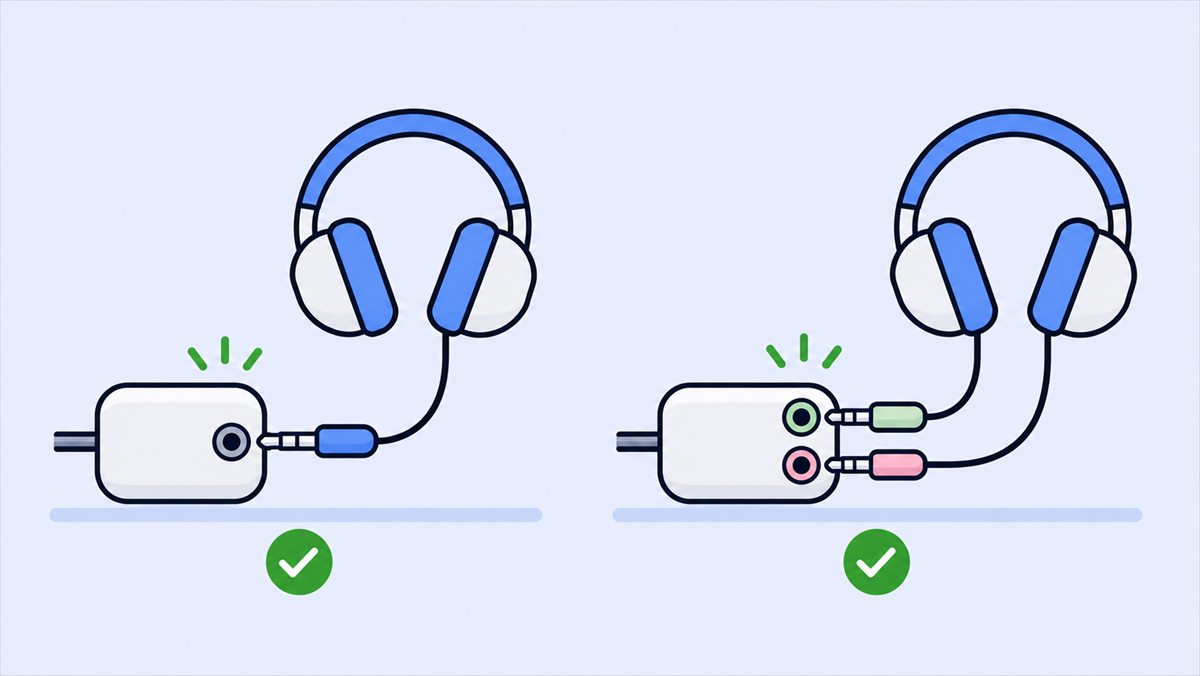
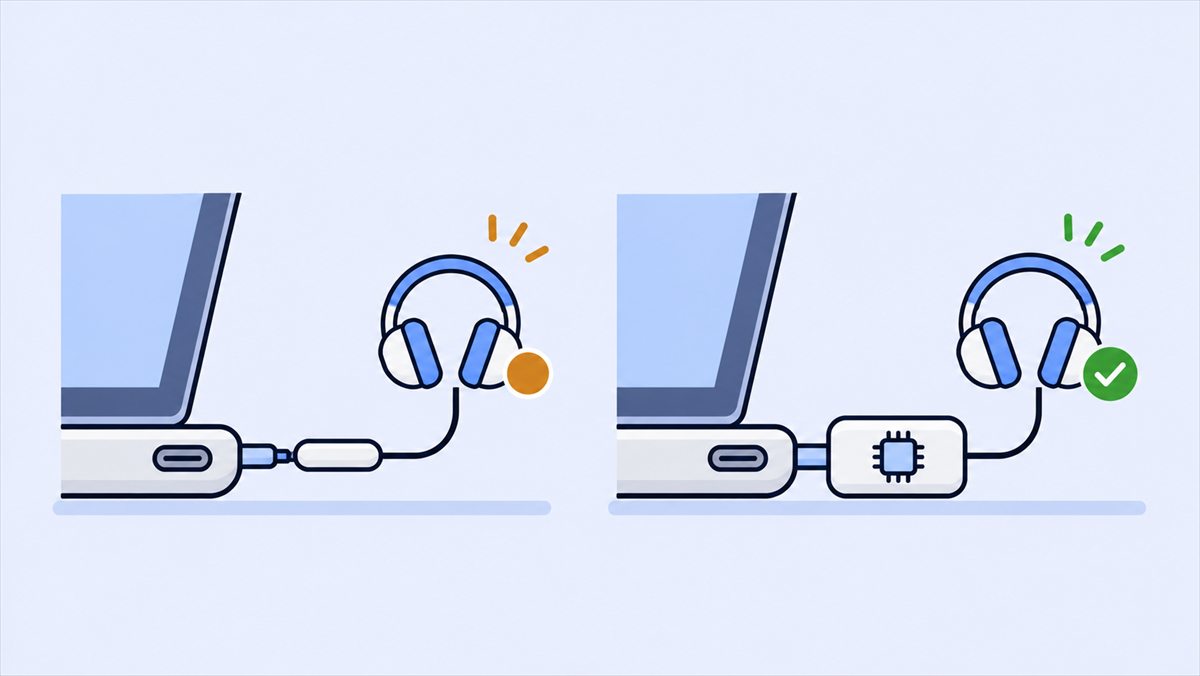
A headset with one plug that carries sound and the mic needs an adapter with one headset jack, like the UGREEN USB-A adapter below or the Creative PLAY! 3. A headset with two plugs, one for sound and one for the mic, needs separate jacks, like the Sabrent AU-UCMA (USB-C) or the Sabrent AU-EMCB, Plugable and Creative models. Be careful with cheap USB-C to 3.5 mm adapters. UGREEN’s own page for its separate USB-C adapter (a different product from the USB-A pick below) says it has no built-in DAC chip (the part that turns digital audio into sound). It works only with the phones it lists, so it is not a laptop fix.
Jump to your situation
Best for a one-cable headset
UGREEN USB to 3.5mm Jack Audio Adapter
One headset jack for a headset with a single plug, and the Amazon listing says it works with both CTIA and OMTP wiring.
Price band: Under $15
Best for a USB-C laptop
Sabrent USB-C to 3.5mm Audio Adapter (AU-UCMA)
Separate output and mic jacks on a built-in USB-C cable, per Sabrent; for headsets with two plugs.
Price band: Under $15
Best for either headset type
Creative Sound Blaster PLAY! 3
A mic-in jack plus a 4-pole headphone jack with mic, per Creative, and an amp for headphones up to 300 ohms.
Price band: $15–$30
Which adapter fits your headset?
Look at the plug on your headset. The kind of plug decides which adapter can pass the mic, and a mismatch often gives you sound but no mic.
| Your headset | What to look for | Adapter that fits | Picks here |
|---|---|---|---|
| One plug that carries sound and mic | A single 3.5 mm plug (called TRRS or 4-pole) on a cable with a small mic | An adapter with one headset jack | UGREEN; Creative PLAY! 3 (its 4-pole jack) |
| Two plugs, one for sound and one for the mic | Two 3.5 mm plugs, often colored green and pink | An adapter with separate headphone and mic jacks | Sabrent AU-UCMA (USB-C), Sabrent AU-EMCB, Plugable, Creative PLAY! 3 (its Mic In jack) |
| Headphones with no mic | A 3.5 mm plug on a plain cable | Any of them | All five |
| A USB or Bluetooth headset | Plugs into USB, or connects wirelessly | No adapter needed | See our guide to earbuds and headsets with a mic |
Microsoft’s help page notes that some computers use a green jack for sound output and a pink jack for mic input, and the Sabrent AU-UCMA uses the same colors for its two jacks. For Plugable’s adapter, the maker lists 3.5 mm (TRS) plugs, the plain three-contact kind used for sound-only headphones and separate mic plugs, so check before pairing it with a one-plug headset. One-plug headsets come in two wiring standards, CTIA and OMTP, and UGREEN’s Amazon listing says its adapter supports both.
Test the mic in a minute
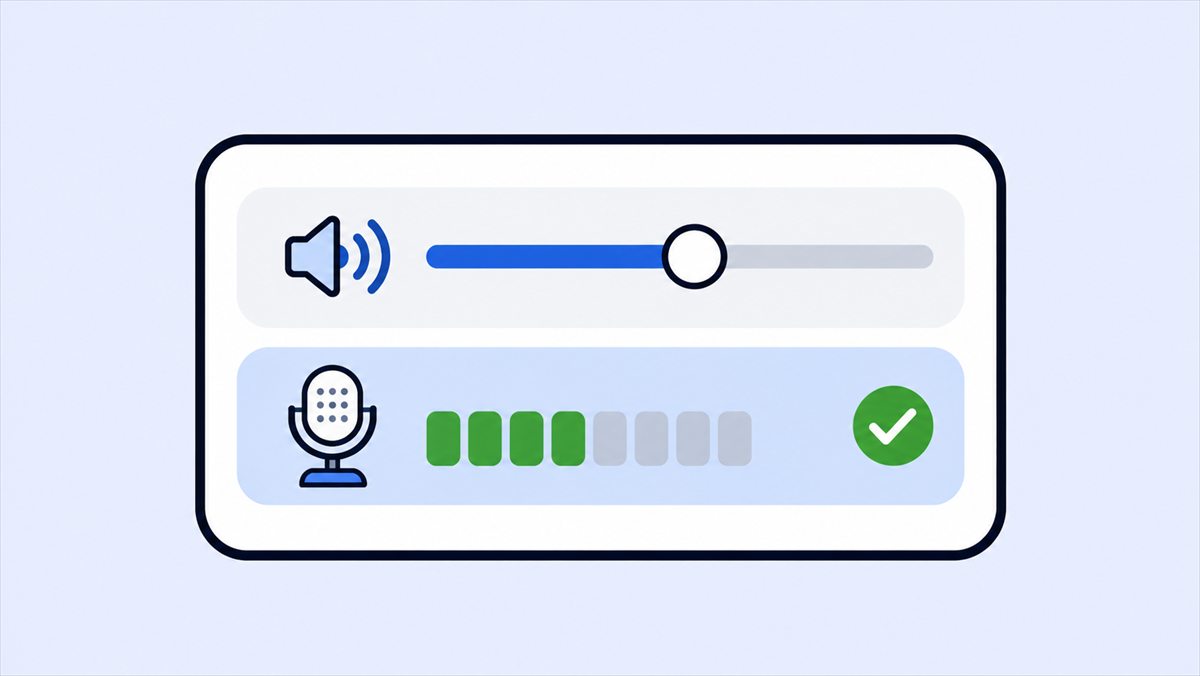
Do this before you rely on the adapter for a call. The steps are for Windows and come from Microsoft Support.
- Plug the headset into the adapter, then plug the adapter into your computer.
- Select Start, Settings, System, then Sound.
- Under Output, choose the adapter. Plugable’s page also says to set a USB audio device as the default input and output, and you may need to pick it inside apps such as Discord or Skype.
- Under Input, choose the adapter’s microphone and open its Properties (the arrow to the right of the device).
- Under Input settings, select Start test and speak normally. Then select Stop test and Play to hear your recording.
- If it is too quiet, raise the Input volume slider. If nothing records, try the other jack or port, and check the plug table above.
If Windows does not see the adapter or your headphones at all, see headphones not detected on a PC. If the mic works but is quiet, see how to make a headset mic louder.
USB-C to 3.5 mm: the part that decides if it works on a laptop
A laptop sends digital audio over USB, so an adapter needs its own sound chip, called a DAC (digital-to-analog converter), to turn it into the analog signal a 3.5 mm headset wants. Some cheap USB-C to 3.5 mm adapters have no such chip and only pass along an analog signal some phones send over USB-C. UGREEN’s page for its USB-C to 3.5 mm adapter says exactly this: it has no built-in DAC chip and only supports the devices it lists, which are phones from Huawei, OnePlus, Oppo, Xiaomi and Honor.
| Adapter type | Works on | What to check |
|---|---|---|
| USB audio adapter, a small external sound card (all five here) | Computers that send digital audio over USB | The jack layout, and that its maker lists your operating system |
| USB-C adapter without a DAC chip | Only the phones its maker lists, per UGREEN | The maker’s device list before buying; do not assume a laptop works |
| A USB-A adapter on a USB-C laptop | Needs a USB-C to USB-A adapter or a hub | That your laptop has a USB-A port or a way to add one |
Sabrent says its AU-UCMA works with most USB Type-C host devices, so check your port before assuming it will work.
The five adapters compared
No adapter below has an independent mic test. The details are the makers’ (UGREEN’s are from its Amazon listing), and each product section names the source.
| Product | Port | Jack layout | Price band | Best for | Link |
|---|---|---|---|---|---|
| UGREEN USB to 3.5mm Jack Audio Adapter | USB-A | One headset jack (TRRS, per the listing) | Under $15 | A headset with one plug, on a USB-A port | Check price on Amazon (opens in a new tab) |
| Sabrent USB-C to 3.5mm Audio Adapter (AU-UCMA) | USB-C (built-in cable) | Two jacks: green output, pink mic input | Under $15 | A headset with two plugs, on a USB-C laptop | Check price on Amazon (opens in a new tab) |
| Creative Sound Blaster PLAY! 3 | USB-A | Mic-in jack plus a 4-pole headphone jack with mic | $15–$30 | Either headset type, and headphones that need more power | Check price on Amazon (opens in a new tab) |
| Plugable USB Audio Adapter | USB-A | Headphone jack and mic jack (3.5 mm TRS) | Under $15 | Replacing a dead jack with a two-plug headset | Check price on Amazon (opens in a new tab) |
| Sabrent Aluminum USB External Stereo Sound Adapter (AU-EMCB) | USB-A | Audio and mic jacks (layout not stated) | Under $15 | The lowest-cost option for a PC-style headset | Check price on Amazon (opens in a new tab) |
UGREEN USB to 3.5mm Jack Audio Adapter: best for a one-cable headset
Port: USB-AJack: One TRRS headset jack (Amazon listing)Price band: Under $15
This UGREEN adapter plugs into a USB-A port and gives you one 3.5 mm jack for headphones, a headset or speakers. The Amazon listing says it has a built-in chip, works with CTIA and OMTP headsets (two ways of wiring the four contacts of a one-plug headset), and plays sound at up to 24-bit/96 kHz, though the mic does not support 24-bit/96 kHz. It says the mic connection needs a TRRS plug (the four-contact kind a one-cable headset uses), that it supports headphones under 50 ohms but not high-resistance ones, and that it needs no driver. The listing names Windows 11 and 10, Linux, Chromebooks, a 2019 MacBook Pro and a 2018 MacBook Air, and says it does not support Apple headphone line control. UGREEN’s US site does not show this adapter, so these are the Amazon listing’s statements. There is no independent test of its mic.
Pros
- One jack for a headset with a single plug, per the Amazon listing
- Works with both CTIA and OMTP headsets, per the listing
- Aluminum shell and nylon-braided cable, 9.8 inches long, per the listing
- No driver needed; the listing names Windows 11 and 10, Linux and Chromebooks
Cons
- UGREEN’s US site does not show this adapter, so the details are the Amazon listing’s
- No independent review or lab test of its mic
- Built for one-plug headsets: a headset with two plugs needs an adapter with separate jacks
- The listing says it supports headphones under 50 ohms, not high-resistance ones, and that the mic is not 24-bit/96 kHz
Who should skip it
Skip it if your headset has two plugs, one for sound and one for the mic, if you use high-resistance headphones (the listing says under 50 ohms is supported), or if your laptop has only USB-C ports and you do not want to add a USB-C to USB-A adapter.
Where the details come from
There is no independent review of this adapter, and UGREEN’s US site does not show it, so we rely on the Amazon listing’s own description. For a related UGREEN product, its own USB-C adapter page says the adapter has no DAC chip and only supports the phones it lists, which is why this guide favors adapters that describe themselves as sound cards or DACs for laptops.
Sabrent USB-C to 3.5mm Audio Adapter (AU-UCMA): best for a USB-C laptop
Port: USB-C, built-in cableJacks: Green output, pink mic inputPrice band: Under $15
Sabrent’s page says this adapter acts as a USB sound card with stereo output and mono mic input, through two 3.5 mm analog jacks (output in green, mic input in pink) and an integrated USB-C cable. Sabrent lists 16 or 24-bit audio at up to 96 kHz, power drawn from the USB port, plug-and-play setup and an aluminum shell, and says it works with most USB Type-C host devices. Because it has separate jacks, it suits a headset with two plugs; Microsoft’s help page notes that some computers also label a green jack for sound output and a pink jack for mic input.
Pros
- Separate output (green) and mic (pink) jacks, per Sabrent
- Built-in USB-C cable and aluminum shell, per Sabrent
- Stereo output and mono mic input at up to 96 kHz, per Sabrent
- Powered by the USB port and plug-and-play, per Sabrent
Cons
- Built for a headset with two plugs: a one-plug headset needs a different adapter
- Sabrent says it works with most USB Type-C host devices, not all
- No independent review or lab test of the mic, only Sabrent’s own claims
- Sabrent lists a 2-year warranty only with registration within 90 days
Who should skip it
Skip it if your headset has one plug that carries sound and mic, or if your laptop has no USB-C port.
Where the details come from
These details are from Sabrent’s own product page, checked November 15, 2026. Sabrent’s own store listed it as sold out that day, so check the Amazon listing for stock. There is no independent review, so the claims above are the maker’s.
Creative Sound Blaster PLAY! 3: best for either headset type
Port: USB-AJacks: Mic-in plus 4-pole headphone jack with micPrice band: $15–$30
Creative’s page lists a Mic In jack and a separate 4-pole headphone-out jack with mic. It says it takes headsets with a single plug or with split stereo and mic plugs without a Y-splitter cable (a cable that splits one plug into two). It also lists a headphone amp for up to 300 ohms (headphones with higher ohms are harder to power), about 93 dB signal-to-noise and mic recording at 24-bit/48 kHz. Creative says basic use needs no drivers (its control panel is an optional download). Senses (October 2017) reviewed it on a Mac and found headphones that were hard to drive directly sounded noticeably better, and noted it has one jack for headphones and one for a mic. The reviewer did not test the mic, and the review says Creative contacted the site about the product.
Pros
- Takes a headset with one plug or with two plugs, per Creative
- Headphone amp for headphones up to 300 ohms, per Creative
- No drivers needed for basic use, per Creative
- Senses found hard-to-drive headphones sounded noticeably better, on a Mac in 2017
Cons
- Costs more than the other four: $15–$30
- Creative’s US page lists Windows 7 to 10 and Mac OS X 10.9 or later; it does not list Windows 11
- The one independent review is from 2017, on a Mac, and did not test the mic
- USB-A only: a USB-C laptop needs a USB-C to USB-A adapter
Who should skip it
Skip it if you only want the lowest-cost fix for a dead jack: the Sabrent and Plugable adapters cost less. Also skip it if your laptop has only USB-C ports.
What the review says
The Senses review is by one reviewer, dates from October 11, 2017, covers sound output on a Mac and does not test the mic input. The reviewer calls the mic input pointless for a professional because USB mics are better, which is not our use. Creative’s own page is the source for the mic and jack details.
Plugable USB Audio Adapter: best for replacing a dead jack
Port: USB-AJacks: Headphone and mic, 3.5 mm TRSPrice band: Under $15
Plugable’s page says this adapter adds a headphone and microphone jack to almost any USB PC or laptop, needs no drivers on Windows, macOS, Chrome OS or Linux, and works with 3.5 mm (TRS) headphones, headsets, speakers or microphones. It suggests it as a replacement for a faulty audio port and says to set it as the default input and output device. Plugable also warns that depending on your platform the adapter can add sound output but the microphone input may not work, and that cars and TVs are not compatible.
Pros
- Adds a headphone jack and a mic jack to almost any USB PC or laptop, per Plugable
- No drivers needed on Windows, macOS, Chrome OS or Linux, per Plugable
- Plugable offers 2-year coverage and lifetime support, per its page
- A replacement for a faulty audio port, per Plugable
Cons
- Plugable warns the mic input may not work on some platforms
- Plugable’s page lists 3.5 mm (TRS) plugs, so check before using a one-plug headset
- Not compatible with cars or TVs, per Plugable
- No independent review or lab test of the mic
Who should skip it
Skip it if your headset has one plug that carries sound and mic, or if you need a guarantee that the mic works on your computer: Plugable itself says it may not.
Where the details come from
These details are from Plugable’s product page, checked November 15, 2026. There is no independent review of the mic input, so the warning above is the maker’s own.
Sabrent Aluminum USB External Stereo Sound Adapter (AU-EMCB): best low-cost USB-A pick
Port: USB-AJacks: Audio and mic (layout not stated)Price band: Under $15
Sabrent’s page says this adapter converts USB to 3.5 mm audio and microphone signals and lets PC-style 3.5 mm headsets with a microphone be used on a Mac. It is a USB 2.0 high-speed device with plug-and-play setup, no extra power or driver, and an aluminum finish; Sabrent extends the warranty to 2 years if you register within 90 days. The page does not spell out the jack layout, so confirm that your headset has two plugs before you buy.
Pros
- Converts USB to 3.5 mm audio and mic signals, per Sabrent
- No extra power, software or driver needed, per Sabrent
- Works with PC-style headsets with a mic on a Mac, per Sabrent
- Sabrent offers a 2-year warranty with registration
Cons
- Sabrent’s page does not say how the jacks are laid out
- USB-A only
- No independent review or lab test of the mic
- The warranty extension needs registration within 90 days
Who should skip it
Skip it if your headset has one plug that carries sound and mic, or if you want a maker page that spells out the jack layout.
Where the details come from
Sabrent’s product page, checked November 15, 2026, is the only source for this adapter. It says “PC style” headsets, which we take to mean headsets with separate plugs, but the page does not say so.
Verdict
Look at your headset’s plug first. With one plug that carries sound and the mic, the UGREEN USB-A adapter is the one-jack pick, with the caution that its details come from the Amazon listing and we found no independent test of its mic. With two plugs on a USB-C laptop, the Sabrent AU-UCMA has two clearly described jacks on a built-in USB-C cable. The Creative PLAY! 3 is the pick if you want something that takes either headset type, at a higher price and with a 2017 Mac review as its only independent evidence. Whichever you choose, test the mic with the steps in this guide before your next call.
If the mic still does not work
- Check the plug table above: a one-plug headset in a two-jack adapter, or the reverse, is the common mismatch.
- Make sure the adapter is the selected input in Settings, System, Sound, not only the output.
- Try another USB port, and plug the adapter in directly rather than through a hub.
- Plugable says the mic input may not work on some platforms, so a Sabrent or Creative adapter may be the fix.
- If others hear an echo of you, see our guide to fixing mic echo on calls.
More audio and call gear guides
- Best wireless earbuds for a computer or laptop: if you would rather skip wires and adapters.
- Best headphones and earbuds for a Chromebook: what plugs into a Chromebook’s ports.
- All DeskConsensus guides: every guide in one place.
Frequently asked questions
Does a USB audio adapter have a mic input?
Some do. The Sabrent AU-UCMA and AU-EMCB, the Plugable adapter and the Creative PLAY! 3 all list a mic jack or microphone signal on their makers’ pages, and the UGREEN listing says “TRRS mic”. Plugable adds that the mic input may not work on some platforms, so test it.
What is the difference between a one-plug and a two-plug headset?
A one-plug headset carries sound and the mic through a single 3.5 mm plug (TRRS, or 4-pole). A two-plug headset has one plug for sound and a separate one for the mic, often colored green and pink. The adapter’s jacks need to match.
Will a USB-C to 3.5 mm adapter work on my laptop?
Only if it has its own sound chip. UGREEN’s page for its USB-C to 3.5 mm adapter says it has no built-in DAC chip and only supports the phones it lists. The Sabrent AU-UCMA is described by Sabrent as a USB sound card that works with most USB Type-C host devices.
Does Apple’s USB-C to 3.5 mm adapter support a mic?
Apple does not say. Apple’s store page describes the adapter as connecting devices with a standard 3.5 mm plug, like headphones or speakers, to USB-C devices, and does not mention microphones. For calls, choose an adapter whose maker says it supports a mic.
Can an adapter fix a laptop whose headphone jack stopped working?
It can sidestep it. Plugable’s page suggests its adapter as a replacement for a faulty audio port. If Windows does not see your headphones at all, see headphones not detected on a PC first.
Do these adapters need drivers?
Plugable, Sabrent and Creative each say basic use needs no drivers. Creative adds that its control panel and effects are an optional download.
Is there an independent test of mic quality on these adapters?
We did not find one. The only independent review we found is a 2017 Mac review of the Creative PLAY! 3’s sound, which did not test the mic. The mic details here are the makers’.
How we research
For this guide we used the makers’ own pages (Creative, Plugable and Sabrent), UGREEN’s page for its USB-C adapter, the Amazon listing description for the UGREEN USB-A adapter, Apple’s store page, and Microsoft’s help page for the mic test. The only independent review we found is a 2017 review of the Creative PLAY! 3 on a Mac, written after Creative contacted the site. We do not test products ourselves, and we say when evidence is thin: we found no independent test of microphone input on any adapter. We look for reviewers who bought the product themselves and were not sponsored, and we use sponsored reviews as little as possible.
Written by