
Light Bar for a Thin or Slim Monitor: How to Check the Fit
Most clip-on light bars sit on top of the monitor, so how thick the monitor is decides whether the clip holds. Very slim monitors, and monitors with a curved or bulging back, are where people run into trouble.
This guide shows how to measure your monitor, compares the thickness ranges that BenQ and Quntis list for their light bars, and explains what to do when your monitor is outside the range.
How we researched this
We don’t test products ourselves. The figures come from BenQ’s and Quntis’s own product and specification pages and from BenQ’s buying guide. We have not tested how any light bar fits a particular monitor, and we found no independent fit test, so treat the ranges as the makers’ figures. See the full method.
Quick answer
Measure your monitor’s thickness at the top center, including any bump on the back, and compare it with the thickness range the light bar’s maker lists. BenQ lists 0.43 cm (0.17 inch) as the minimum for the ScreenBar Halo 2, and the Quntis models we checked list 0.3 cm (0.12 inch), so a slim monitor is usually fine. The original BenQ ScreenBar Halo starts at 0.7 cm for flat monitors and 1.6 cm for curved ones. If your monitor is outside a range, or its back is curved or bulging, pick a model whose range covers it, or a light bar that clamps to the desk instead, such as the BenQ ScreenBar Max. Looking for options? See our guide to the best monitor light bars.
How to measure your monitor for a light bar
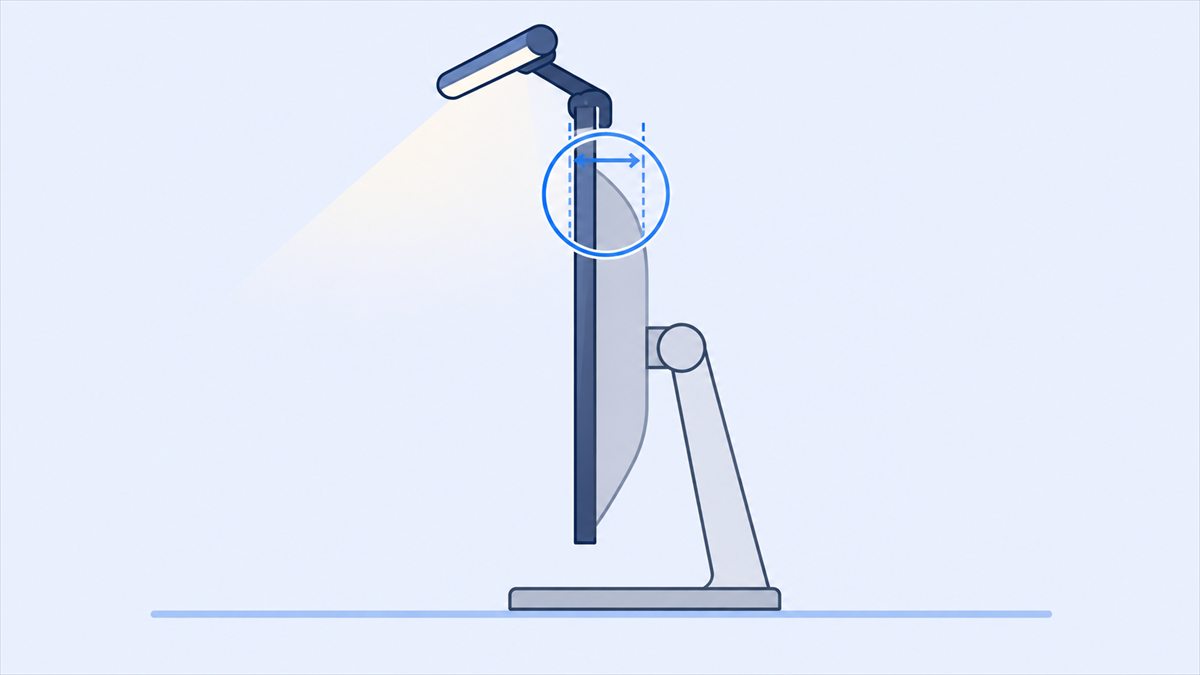
BenQ’s advice is to measure the thickness at the top center of the screen, including any curved or protruding section on the back. Do it in the same units as the maker’s range (centimeters or inches).
- Find the top center of the screen, where the light bar will sit.
- Measure the thickness there, from the front of the bezel (the frame around the screen) to the back of the monitor.
- If the back has a curve, ridge or bulge near the top, include it in the measurement.
- Write the number down and compare it with the range in the table below.
Thickness ranges the makers list
These are the makers’ own figures. Quntis publishes no minimum bezel width, so thickness is the number to check. See BenQ’s Halo 2 specifications, the original Halo page, the ScreenBar Max specifications and Quntis’s comparison table.
| Light bar | Where it mounts | Thickness it lists |
|---|---|---|
| BenQ ScreenBar Halo 2 | Clamp on the monitor, flat or curved | 0.43–6 cm (0.17–2.36 in) |
| BenQ ScreenBar Halo (original) | Clamp on the monitor | Flat 0.7–6 cm (0.3–2.4 in); curved 1.6–3.8 cm (0.6–1.5 in) |
| BenQ ScreenBar Max | Clamp on the desk edge, not the monitor | Maximum clampable thickness 6 cm (2.36 in) |
| Quntis Focus 40 cm and Focus 52 cm | Clip on the monitor, flat or curved | 0.3–8 cm (0.12–3.15 in) |
| Quntis Focus 51 cm and Focus Radar 52 cm | Clip on the monitor, flat or curved | 0.3–10 cm (0.12–3.94 in) |
| Quntis Curved Focus 45 cm (17–34 inch screens) | Clip on the monitor, flat or curved | Up to 9 cm (3.54 in) |
| Quntis Curved 66 cm (32–49 inch screens) | Clip on the monitor, flat or curved | 0.3–8.5 cm (0.12–3.35 in) |
If your monitor is thinner or thicker than the range
- Thinner than the minimum. The original BenQ ScreenBar Halo lists 0.7 cm for flat monitors and 1.6 cm for curved ones. The Halo 2 lists 0.43 cm, and the Quntis models above list 0.3 cm, so a slim monitor may fit one of those where the original Halo would not. Check the exact model, because Quntis lists some models without a thickness range.
- Thicker than the maximum. Pick a model with a higher limit, such as the Quntis models that list up to 10 cm, or a desk-clamp light bar.
Curved, recessed and bulging monitor backs
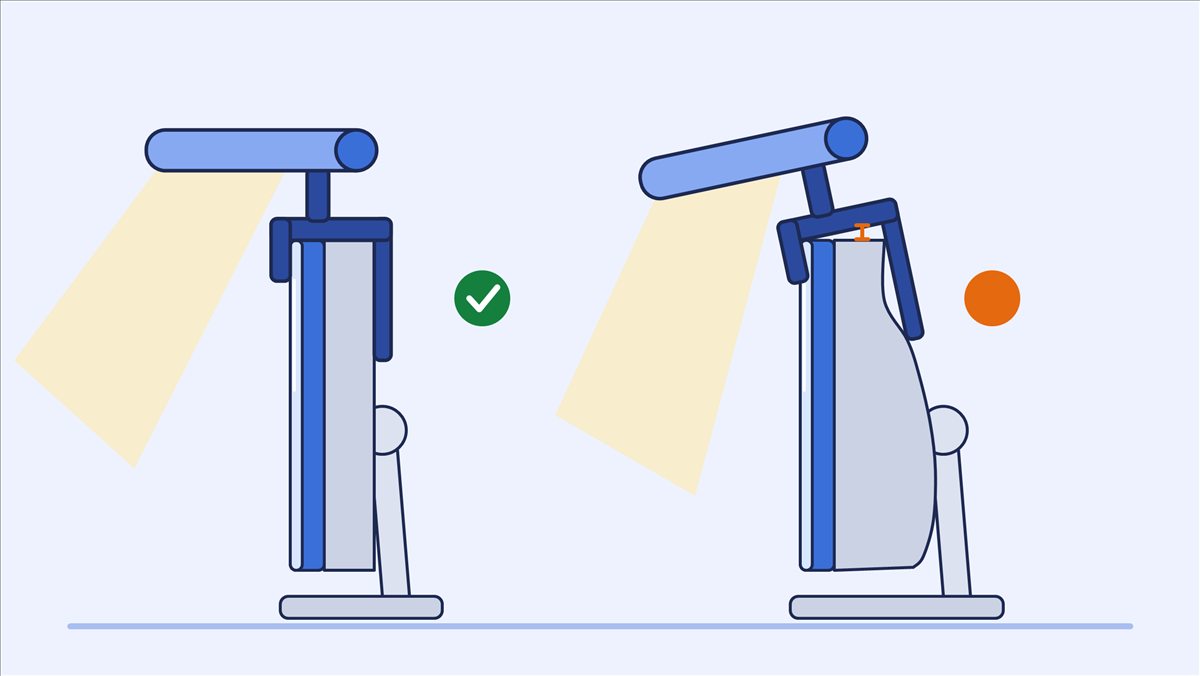
Thickness is only one part of compatibility. BenQ says a curved, recessed or back-bulging monitor may also affect how securely the clip sits, and that different monitor shapes need different mounting designs. BenQ says its ScreenBar series covers flat, 1000–1800R curved (a lower R number means a tighter curve), back-bulging and iMac displays, and Quntis lists curved and flat support for the models in the table. If your monitor has an unusual back, measure the thickness where the clip will rest and check the maker’s compatibility notes before you buy.
A light bar that does not clip on the monitor
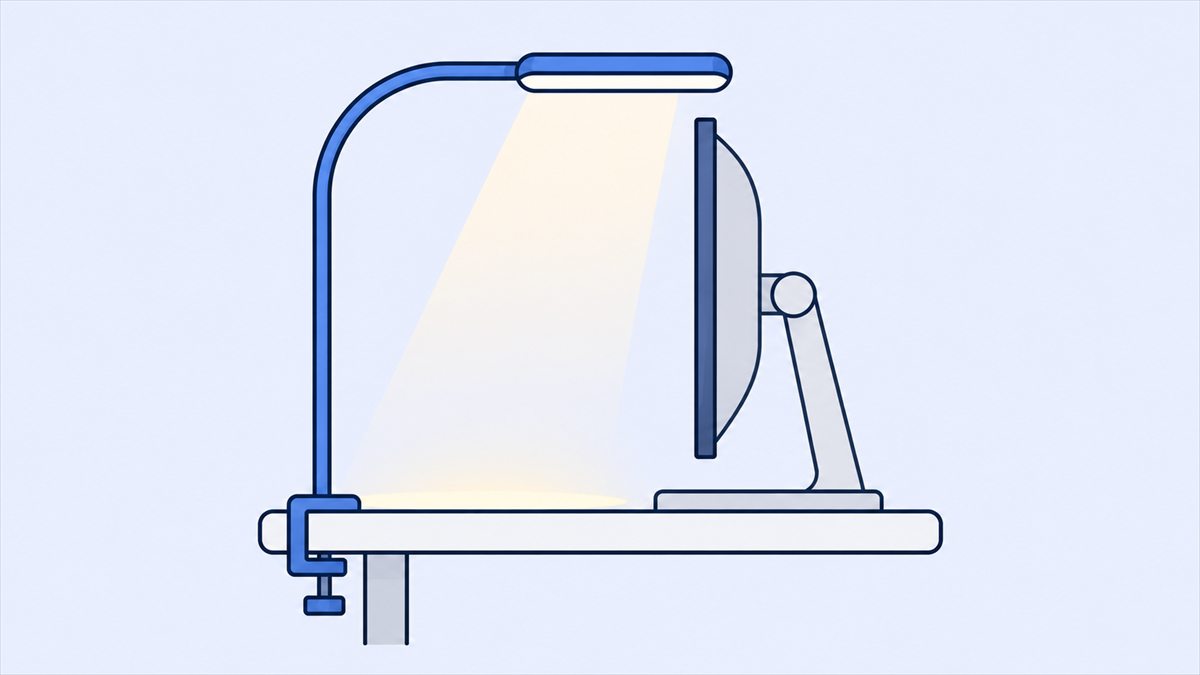
The BenQ ScreenBar Max clamps to the desk edge instead of clipping onto the monitor, and BenQ lists a maximum clampable thickness of 6 cm. BenQ says the clamp is for desks only, not for monitor risers or shelves, and that glass desks are not recommended for the clamp. For those, or for setups that need a freestanding base, BenQ sells the ScreenBar Max Base separately. A strip that sits behind the monitor needs no clip on top at all: see our guide to bias lighting for a monitor.
Check these four things before you buy
- Your monitor’s thickness at the top center, including any bump on the back.
- The thickness range the maker lists for that exact model.
- Whether your monitor is flat or curved, and its screen size, because Quntis lists a size range for each model.
- If you are considering a desk clamp, the thickness of your desk and whether it is glass.
Picking a light bar?
See which light bars reviewers recommend for single, dual and curved screens, with the drawbacks they found.
How we research
For this guide we used BenQ’s knowledge center and specification pages for the ScreenBar Halo, Halo 2 and Max, and Quntis’s light bar comparison table. The thickness ranges are the makers’ own figures, and we say which model each range is for. We do not test products ourselves.
Frequently asked questions
Can a light bar fit a thin or slim monitor?
Often yes, but it depends on the model. BenQ lists a 0.43 cm minimum for the ScreenBar Halo 2 and the Quntis models we checked list 0.3 cm, while the original BenQ ScreenBar Halo lists 0.7 cm for flat monitors. Measure your monitor and compare it with the range for your model.
How do I measure my monitor for a light bar?
Measure the thickness at the top center of the screen, including any curved or protruding section on the back, as BenQ advises.
What is the minimum monitor thickness for a BenQ ScreenBar?
The ScreenBar Halo 2 lists 0.43 cm (0.17 inch). The original ScreenBar Halo lists 0.7 cm for flat monitors and 1.6 cm for curved monitors. The ScreenBar Max clamps to the desk edge instead of the monitor, and BenQ lists a maximum clampable thickness of 6 cm.
Will a light bar fit a curved monitor?
Some do. BenQ says its ScreenBar series covers 1000–1800R curved monitors, and Quntis lists curved and flat support for its Focus and Curved models. Check the range and the screen size for your exact model.
Can I mount a light bar on the desk instead of the monitor?
Yes, with a desk-clamp model such as the BenQ ScreenBar Max. BenQ says the clamp is for desks only and not recommended for glass desks, and sells a separate base for freestanding use.
Written by