
Best Monitor Light Bars for Your Desk (2026)
Disclosure: As an Amazon Associate, we earn from qualifying purchases. This costs you nothing extra and does not change which products we pick. Read our disclosure.
A monitor light bar clips on top of your screen and lights your desk without shining on the display. Some also glow behind the monitor, which reviewers say softens the contrast between a bright screen and a dark wall. This guide compares four light bars for single, dual and curved monitors, explains what to look for, and flags the drawbacks reviewers found.
How we researched this
We don’t test products ourselves. This guide combines manufacturer specs and reviews from Tom’s Hardware, Tom’s Guide and Engadget. We found no lab-measured light bar rankings, so this rests on reviewers’ experience and manufacturer claims. See the full method.
Quick answer
For most desks, a light bar with a rear (bias) light, which shines on the wall behind your monitor, and adjustable brightness and color temperature is worth having.
Our premium pick is the BenQ ScreenBar Halo 2, which reviewers praise for its motion sensor and rear light. If you want to spend much less, the Quntis Monitor Light Bar with Remote is the budget pick. Dual-monitor setups should look at the BenQ ScreenBar Max, and owners of curved ultrawides at the Quntis Curved.
Jump to your situation
Best premium pick
BenQ ScreenBar Halo 2
Tom’s Guide praises its built-in motion sensor, rear light and brighter front light. It fits flat and curved screens.
Price band: $150–$200
Best for dual monitors
BenQ ScreenBar Max
Engadget calls it BenQ’s first ScreenBar for two screens, with a bias light and desk lamp you adjust separately.
Price band: Over $250
Best budget pick
Quntis Monitor Light Bar with Remote
A Tom’s Guide reviewer’s best cheap light bar: remote dial, auto-dimming and a clip that fits most monitors.
Price band: $50–$75
Top picks compared
| Product | Fits and controls | Rear (bias) light | Price band | Main drawback | Best for | Link |
|---|---|---|---|---|---|---|
| BenQ ScreenBar Halo 2 | Flat and curved monitors; wireless puck | Yes (bias light) | $150–$200 | High price; needs enough USB power | Premium single-monitor desk with rear lighting and a motion sensor | Check price on Amazon (opens in a new tab) |
| BenQ ScreenBar Max | Dual monitors; touch panel and presence sensing | Yes, adjustable separately | Over $250 | Very expensive; awkward mode button | Two monitors on a desk, not wall-mounted | Check price on Amazon (opens in a new tab) |
| Quntis Curved Monitor Light Bar | 34-inch and larger curved screens (1000R to 3000R); wireless puck | Yes, RGB | $50–$75 | Only for large curved screens | 34-inch and larger curved ultrawide monitors | Check price on Amazon (opens in a new tab) |
| Quntis Monitor Light Bar with Remote | Flat and curved monitors (up to 1000R); remote dial | Not mentioned by the reviewer | $50–$75 | No rear light mentioned; older review | Anyone who wants a simple, low-cost front light | Check price on Amazon (opens in a new tab) |
BenQ ScreenBar Halo 2: best premium pick for a single monitor
Fits and controls: Flat and curved monitors; wireless puckRear (bias) light: Yes (bias light)Price band: $150–$200
The Halo 2 lights your desk from the front and your wall from behind. Tom’s Guide recommends it over the original Halo for three reasons: a wider, brighter rear light, a front light raised from 800 to 1,000 lux (a measure of how bright the light is on your desk), and a built-in ultrasonic motion sensor. The sensor turns it off when you leave and on when you sit down. It also adds an AC adapter and a webcam mounting kit in the box.
Pros
- Motion sensor that turns the light on and off as you arrive and leave, per Tom’s Guide
- Rear (bias) light and a front light up to 1,000 lux, per Tom’s Guide
- Clamp redesigned for both flat and curved displays
- AC adapter and webcam mounting kit included
- Rechargeable wireless puck (a small controller you keep on the desk) for brightness and color temperature
Cons
- Costs much more than most light bars; Tom’s Hardware called the original Halo’s price fairly steep
- Needs enough power: Tom’s Guide says it will not work properly on an underpowered USB port, which is why the adapter is included
- Tom’s Hardware’s reviewer found the much cheaper Xiaomi Computer Monitor Light Bar matched most of the original Halo’s features except bias lighting
Who should skip it
Skip it if you only want a basic front light, are on a budget, or have two monitors that need even coverage.
What the reviewers say
Tom’s Guide (September 2025) mounted the Halo 2 on an ultrawide monitor and recommends it over the original Halo. It notes the price stayed the same even with the upgrades and that the motion sensor worked as described. Tom’s Hardware (February 2026) lists it as the premium option with bias lighting and a remote puck, and says its author’s original Halo was matched by a Xiaomi bar apart from the bias lighting. Both are single-reviewer impressions, not lab measurements. BenQ’s claim that its optics avoid glare on the screen is the manufacturer’s own.
BenQ ScreenBar Max: best for dual-monitor setups
Fits and controls: Dual monitors; touch panel and presence sensingRear (bias) light: Yes, adjustable separatelyPrice band: Over $250
The ScreenBar Max is BenQ’s first light bar built for two screens. Engadget says it combines a bias light and a desk lamp in one bar long enough to span two monitors, with separate brightness controls for each. Its presence sensor turned the light on when the reviewer sat down and ignored them walking past. For a separate lamp on the desk, see our guide to swing-arm and gooseneck desk lamps.
Pros
- Spans two monitors, with bias light and desk lamp adjusted independently, per Engadget
- Presence sensing that worked reliably in Engadget’s review
- Color temperature from 2,700 K (warm) to 6,000 K (cool white)
- Engadget saw no glare on either screen (a slight shine off a tablet’s aluminum rail) and no flicker, harshness or heat
- Shortcuts for auto-dim and a monitor reading mode
Cons
- Very expensive, and Engadget notes the stand is an optional extra
- You switch one mode button between bias light, desk light and both to change either one, per Engadget
- Extends forward more than backward, which matters if your monitors are wall-mounted, per Engadget
- Color temperature is shared by both lights
Who should skip it
Skip it if you have one monitor, are on a budget, or mount your monitors on a wall.
What the reviewers say
Engadget (August 2026) tested a review sample for five days and calls it a very nice desk lamp and bias light combo, especially for multi-screen setups, but expensive. BenQ rates its color rendering (how true colors look under the light) at Ra 95 or higher; the reviewer found no reason to doubt that but did not measure it. It is a new product, so there is little long-term feedback yet.
Quntis Curved Monitor Light Bar: best for curved ultrawide monitors
Fits and controls: 34-inch and larger curved screens (1000R to 3000R); wireless puckRear (bias) light: Yes, RGBPrice band: $50–$75
Standard straight light bars can look wrong on a big curved panel. This Quntis is made for curved screens of 34 inches and up, extends to about 25.7 inches wide, and uses two curved arms. Its Tom’s Guide reviewer, who uses a 49-inch ultrawide, said adding the light bar softened the step between the bright monitor and the dark wall, while the RGB rear light was less impactful than hoped (see Cons).
Pros
- Designed for 34-inch and larger curved displays, per Tom’s Guide
- Front light with four brightness levels and adjustable color temperature
- RGB backlight, all controlled wirelessly with the included puck
- Triple folding clip sits on top without adhesive
- USB-C power with a detachable cable
Cons
- Made for large curved screens, so it is a poor fit for small or flat monitors
- The reviewer’s experience comes from a single desk and one monitor
- Tom’s Guide’s reviewer found the RGB rear light less impactful than hoped: it shines more upward than backward, so it cannot bounce off the wall, and it is barely noticeable while working
Who should skip it
Skip it if you have a flat or small monitor, or want a plain white rear light.
What the reviewers say
Tom’s Guide (March 2026) says a straight bar on a very large display can look silly and may do more harm than good, and that the Quntis Curved suited their 49-inch ultrawide. Tom’s Hardware also notes that most big-brand light bars lack curved options. The reviewer found the light bar’s downward light avoided hot spots and screen glare that a desk lamp can cause; that is an opinion, not a measurement.
Quntis Monitor Light Bar with Remote: best budget pick
Fits and controls: Flat and curved monitors (up to 1000R); remote dialRear (bias) light: Not mentioned by the reviewerPrice band: $50–$75
A Tom’s Guide reviewer called this the best cheap light bar they had tested. Its weighted clip fits practically any monitor, including curved ones up to 1000R, and the remote puck lets you change brightness and color temperature without reaching over the monitor.
Pros
- Weighted clip fits most monitors, including curved up to 1000R, per Tom’s Guide
- Remote puck with a capacitive dial for brightness and temperature
- Auto-dimming and a 2-hour auto-off timer that doubles as an eye-break reminder
- L-shaped USB-C connector that keeps cables tidy
- Aluminum frame at a low price
Cons
- The review does not mention a rear bias light
- Reviewed in October 2024, so check for newer versions
- The reviewer’s praise comes from one desk with a vertical second monitor
Who should skip it
Skip it if you want bias lighting behind the monitor, a motion sensor, or a dual-monitor bar.
What the reviewers say
Tom’s Guide (October 2024, a deals article) says the weighted clip worked on any screen it tried, the remote dial made adjustments easy, and the evenly spaced LEDs gave a uniform glow. It is a single-reviewer opinion.
Verdict
If you want the best-reviewed premium light bar for one monitor, the BenQ ScreenBar Halo 2 is the pick, because Tom’s Guide recommends it over the original and Tom’s Hardware lists it as the premium option. Two monitors point to the ScreenBar Max if the price is acceptable, and big curved screens to the Quntis Curved. On a budget, the Quntis with Remote gives you a front light and a remote at a fraction of the price, though it lacks the rear light that the premium options add.
Buying guide: what to check before you buy
Monitor light bars look similar, but they differ in coverage, rear lighting, fit and controls. Here is what reviewers say matters, and where the evidence is thin.
What does a monitor light bar do?
A monitor light bar is a strip of LEDs that sits on top of your monitor. According to Tom’s Hardware, many models let you adjust brightness and color temperature, and the shape suits tight desks. A Tom’s Guide reviewer says a light bar shines straight down onto the workspace, which avoids the hot spots and screen glare that a desk lamp off to one side can cause. That is the reviewer’s opinion, not a measured result. A light bar lights your desk, not your face: for lighting on a video call, see our guide to lighting for video calls.
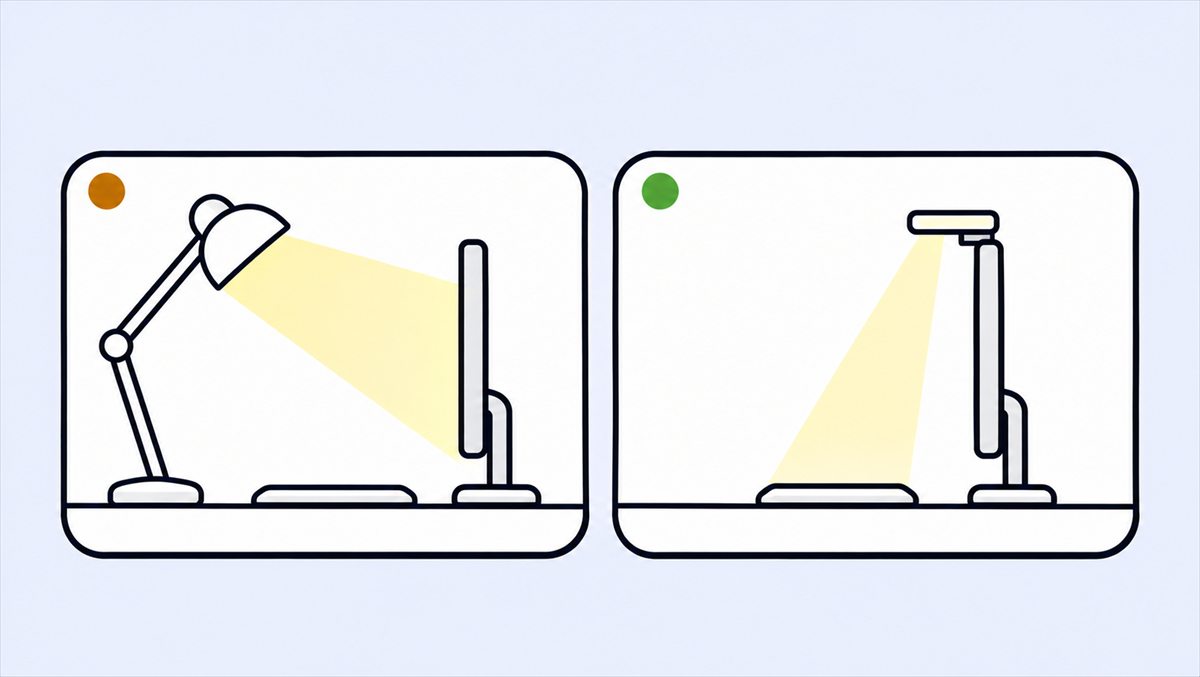
Do you need bias (rear) lighting?
Bias lighting casts light behind the monitor as well as in front of it. Tom’s Hardware says a brighter wall behind the screen can help reduce eye strain in low light, and Engadget says the contrast between a bright screen and a dark wall can exacerbate strain. We found no independent study testing light bars for eye strain, and a Tom’s Hardware forum moderator doubts the benefit of monitors with “eye care” features, so treat the claim as plausible but unproven. If your monitor already has a rear glow, a front-only bar may be enough. For settings, placement and other ways to add it, see our guide to bias lighting for a monitor.
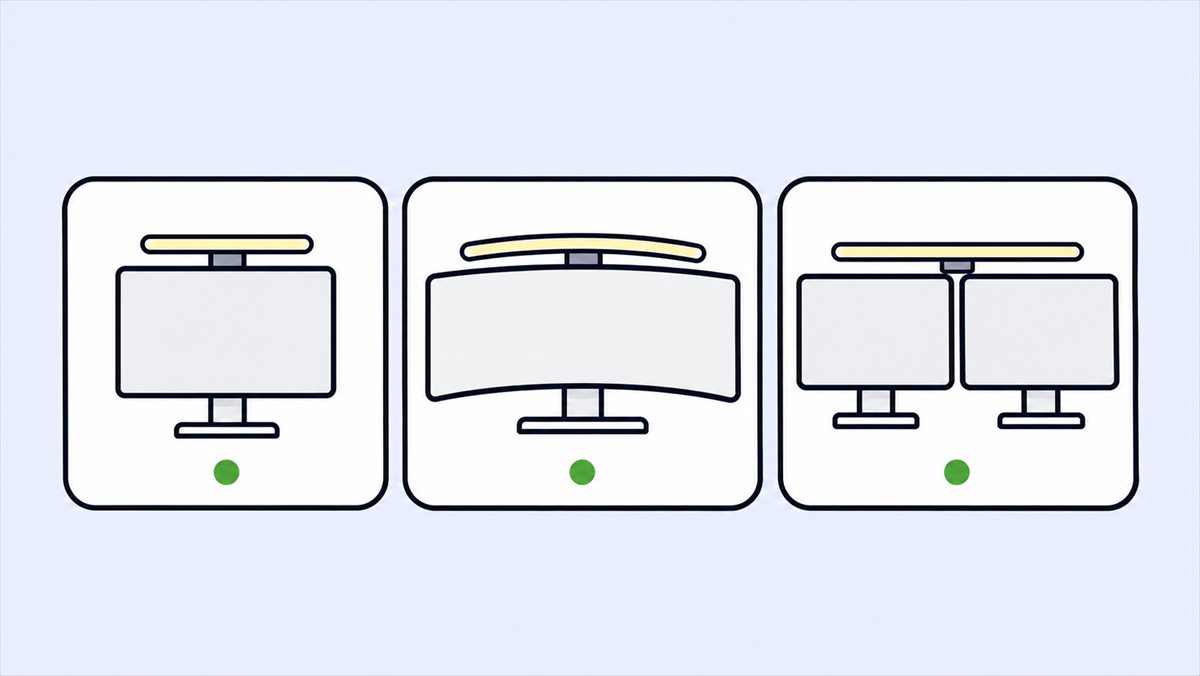
Will it fit your monitor?
| Your setup | What reviewers point to |
|---|---|
| One flat monitor | Most light bars; the Quntis with Remote is a low-cost option |
| Curved monitor | The Halo 2’s clamp fits flat and curved screens; Tom’s Hardware notes most big brands lack curved options |
| Large curved ultrawide (34 inches and up) | The Quntis Curved is built for 1000R to 3000R screens (the R number is the curve; lower means a tighter curve) |
| Two monitors | The ScreenBar Max is built for two screens, and Engadget says it easily lit its reviewer’s 63-inch desk |
| Wall-mounted monitors | Engadget notes the Max extends forward more than backward, so check clearance |
Check the clamp and the curve: Tom’s Hardware advises matching a curved screen’s curve as closely as possible. If your monitor is very thin, see our guide to checking whether a light bar fits a thin monitor.
What should you look for in brightness and controls?
Tom’s Hardware says adjustable brightness and color temperature are crucial, and that a bar fixed at one cold color will frustrate you. Controls vary: BenQ uses a wireless puck, and the Quntis models use a remote or puck. Motion or presence sensing, as on the Halo 2 and Max, saves reaching for a switch.
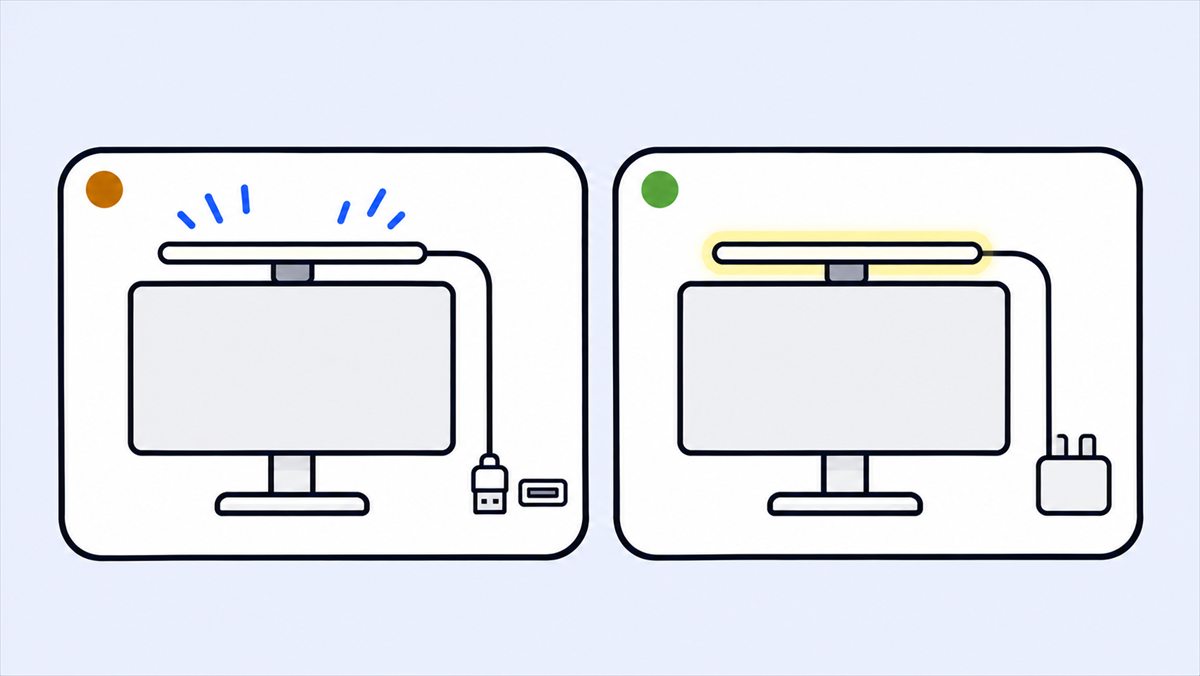
How is it powered?
Most bars take USB power. Tom’s Guide says the BenQ Halo 2 will not work properly with insufficient wattage, which is why BenQ includes an AC adapter. The Quntis bars Tom’s Guide describes use USB-C power.
How to set up a monitor light bar
- Place it so the light lands on your desk, not your screen. A Tom’s Guide reviewer says placement matters most: the bar should shine downward over your keyboard area.
- Check the power first. If a bar flickers or will not run properly, try the supplied adapter, as BenQ includes one with the Halo 2 for exactly this reason.
- Match the clamp to your monitor. Check the supported screen shape before ordering: the Halo 2’s clamp fits flat and curved screens, and the Quntis Curved is built for large curved ones.
- Add a webcam if you need one. The Halo 2 includes a webcam mounting kit that attaches to the top of the bar.
- Adjust brightness and warmth to the task. Tom’s Hardware’s reviewer makes the light colder and brighter for detailed work and dims and warms it for a long gaming session.
For how a bar fits with window and room light, see our guide to lighting for computer work.
How we research
For this guide we compared manufacturer specs with reviews from Tom’s Hardware, Tom’s Guide and Engadget. We do not test products ourselves, and we say where the evidence is thin. We look for reviewers who bought the product themselves and were not sponsored, and we use sponsored reviews as little as possible.
Frequently asked questions
Do monitor light bars reduce eye strain?
Reviewers say they do. Tom’s Guide and Engadget both describe the contrast between a bright screen and a dark wall as a cause of strain. We found no independent test measuring the effect, so treat it as a reviewer’s impression.
What is bias lighting?
Bias lighting is light cast behind your monitor onto the wall. Tom’s Hardware says it can help reduce eye strain in low-light rooms. The BenQ Halo 2 and Max and the Quntis Curved include a rear light. Settings and placement are in our guide to bias lighting for a monitor.
Do monitor light bars work with curved monitors?
Some do. The BenQ ScreenBar Halo 2’s clamp fits flat and curved screens, and the Quntis with Remote fits curved monitors up to 1000R. For 34-inch and larger curved screens, the Quntis Curved is built for 1000R to 3000R.
Is a monitor light bar better than a desk lamp?
It depends on your desk. Tom’s Hardware says a clamp-on lamp can give most of the same effect, but a light bar suits tight spaces. A Tom’s Guide reviewer prefers a light bar because it avoids glare on the screen.
Can one light bar cover two monitors?
The BenQ ScreenBar Max is built for two screens, and Engadget says it easily lit its reviewer’s 63-inch desk.
Do light bars cause glare on the screen?
BenQ says its design avoids glare, which is the manufacturer’s claim. Engadget saw no glare on either screen when testing the ScreenBar Max, apart from a slight shine off a tablet’s aluminum rail. For glare from windows and ceiling lights, see our guide to how to reduce glare on a computer monitor.
Written by